
📑 In this guide
Start with our AI Confidence Quiz
AI is already part of your child’s learning. In just a couple of minutes, discover where your family stands and what to do next.
- ✓ Your family’s AI Confidence Score
- ✓ What you’re already doing well
- ✓ Simple, practical next steps
Protecting Your Family’s Privacy When Using AI: What Every Parent Should Know
AI tools can feel like magic. They help with family routines, schoolwork, and even bedtime stories. But when you use them, you may be asked to share bits of personal information about yourself, your children, or your household. You may have heard advice like “don’t share personal details” or “avoid mentioning a diagnosis,” but not understood exactly why.
This guide explains, in simple terms, what privacy means when you use AI at home, what risks you’re protecting against, and how to use these tools confidently and safely.
What “privacy” really means when using AI
When you talk to an AI tool, it doesn’t just forget what you type.
Most AI systems store, review, or learn from what users write. This can help the company improve its products — but it also means that what you share could be seen, used, or analyzed in ways you don’t expect.
In short:
AI tools remember patterns, not people, but your words can still reveal personal information about you or your child if you’re not careful.
Examples of personal data include:
- Your child’s full name, age, or school
- Health information or learning diagnoses
- Family routines or schedules
- Photos, addresses, or other identifiers
What happens to your data
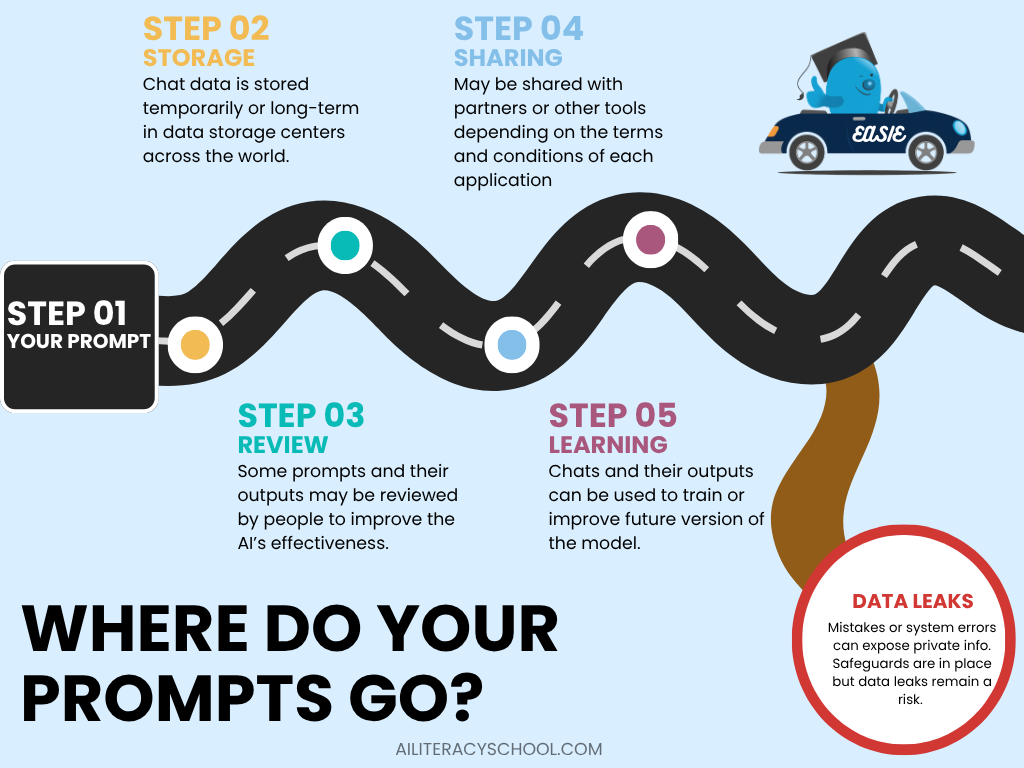
Every AI tool has its own privacy policy, but most follow a similar pattern:
- Your messages are stored for a period of time.
- Some data may be used to improve the system (“training”).
- Employees or reviewers might see sample conversations to check quality.
- Aggregated data can sometimes be used for research or shared with partners.
Even if your name isn’t attached, repeated small details can still form a recognizable picture of your family over time.
What’s at risk for families
The goal isn’t to create fear — it’s to make you aware of what’s being protected.
The risks depend on what you share:
| Type of Information | Possible Consequence |
|---|---|
| Child’s name, school, or location | Can reveal your child’s identity |
| Health or learning diagnosis | Could create a digital record outside your control |
| Family habits or routines | May make patterns visible if data were ever shared |
| Uploaded photos | Can include location or facial recognition data |
Once shared, this information can’t always be deleted or fully retrieved.
Even if you use several different apps, remember that many tools rely on the same AI engine behind the scenes. That means data you think you’ve kept separate could end up in the same system or be analyzed in connected ways.
It’s also important to know that AI companies can and do make mistakes. Technical failures or human error sometimes result in data being made publicly available. Data leaks are always unwelcome, but because AI chatbots often invite open, detailed conversations, leaked information can be more personal and specific than usual.
Why privacy matters especially for children
Children’s data is uniquely sensitive because:
- They can’t consent to sharing it.
- Their information may follow them for years.
- Many AI tools aren’t designed for under-13 use (and aren’t bound by child-specific privacy laws outside school settings).
Protecting privacy means preserving your child’s right to grow up without a digital record they didn’t choose.
How to use AI safely at home
Here are practical steps parents can take right now:
Before you use a new AI tool
- Check the age policy — is it intended for children, or only for adults?
- Read the privacy summary (often under “Data Use” or “Privacy Policy”).
- Use accounts in your name, not your child’s.
While using AI
- Avoid entering real names, school names, or diagnoses.
- Keep prompts general: “a child who finds reading difficult” instead of “my son, 8, who has dyslexia.”
- Skip uploading personal photos or identifiable schoolwork unless the tool explicitly says it’s private and secure.
- Use offline or local tools for highly sensitive content, like journals or health notes.
When helping children use AI
- Always sit together. Young children should not use general chatbots unsupervised.
- Teach simple privacy habits: “Don’t share your full name, school, or birthday online.”
- Use built-in parental controls where available.
Quick Family Privacy Checklist for AI Use
Before you share information with an AI tool, ask:
- Do I understand what data this tool collects?
- Am I using it through my own account, not my child’s?
- Have I avoided sharing identifiable or sensitive details?
- Can I delete or review my data if I change my mind?
- Would I be comfortable if this text were accidentally made public?
If all answers are “yes,” you’re likely using AI safely.
You can use AI safely
Privacy doesn’t mean avoiding AI; it means using it wisely.
By pausing before you share, using privacy settings, and supervising your child’s use, you can enjoy AI’s benefits without exposing your family’s data.
AI is most powerful when it helps families learn, create, and grow, not when it collects personal stories.
Was this guide helpful?
Let us know whether this article helped you.
Share this guide with other parents
Know a parent who would find this guide helpful? Enter their email address and we'll send them the Parent Conversation Guide directly.