📑 In this guide
Start with our AI Confidence Quiz
AI is already part of your child’s learning. In just a couple of minutes, discover where your family stands and what to do next.
- ✓ Your family’s AI Confidence Score
- ✓ What you’re already doing well
- ✓ Simple, practical next steps
How your AI Skills will improve in this guide
This lesson supports parents who want to use AI image generators to create simple visual reminders, rather than perfect designs, that help children think, remember, and discuss behaviour, safety, and social situations.
Before this lesson (Novice stage)
Parents often:
- feel unsure how to describe what they want visually
- type long, vague requests and get confusing or unsuitable images
- struggle to make images age-appropriate
- accept images that look fun but don’t support the message
- worry about “doing it wrong” or needing design skills
After this lesson (Skilled beginner using a clear image prompt)
You will be able to:
- describe visual ideas clearly and simply
- guide AI toward calm, child-friendly designs
- create posters that support conversations, not lectures
- adjust tone and complexity for different ages
- use AI confidently while staying in control and aligned with family values
This is not about becoming a designer.
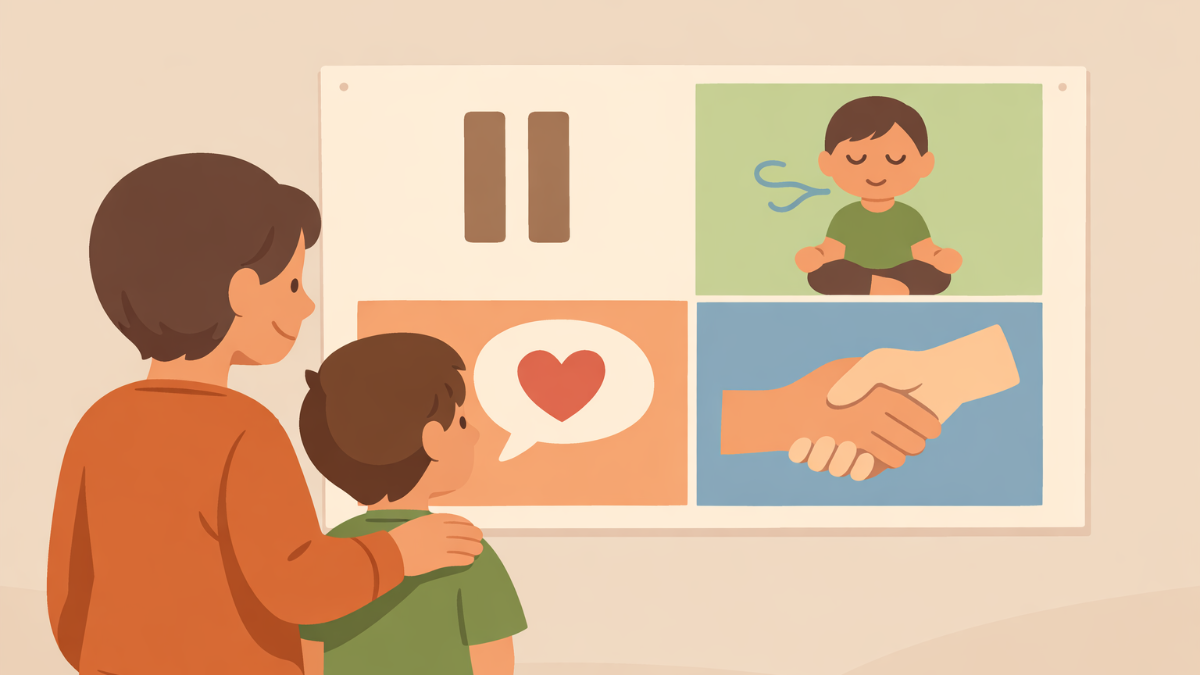
It is about thinking clearly and guiding the tool thoughtfully to create visual thinking guides like the one below. You can print them to display on bedroom walls or use them on a laptop or tablet screen to form a focus for conversations.
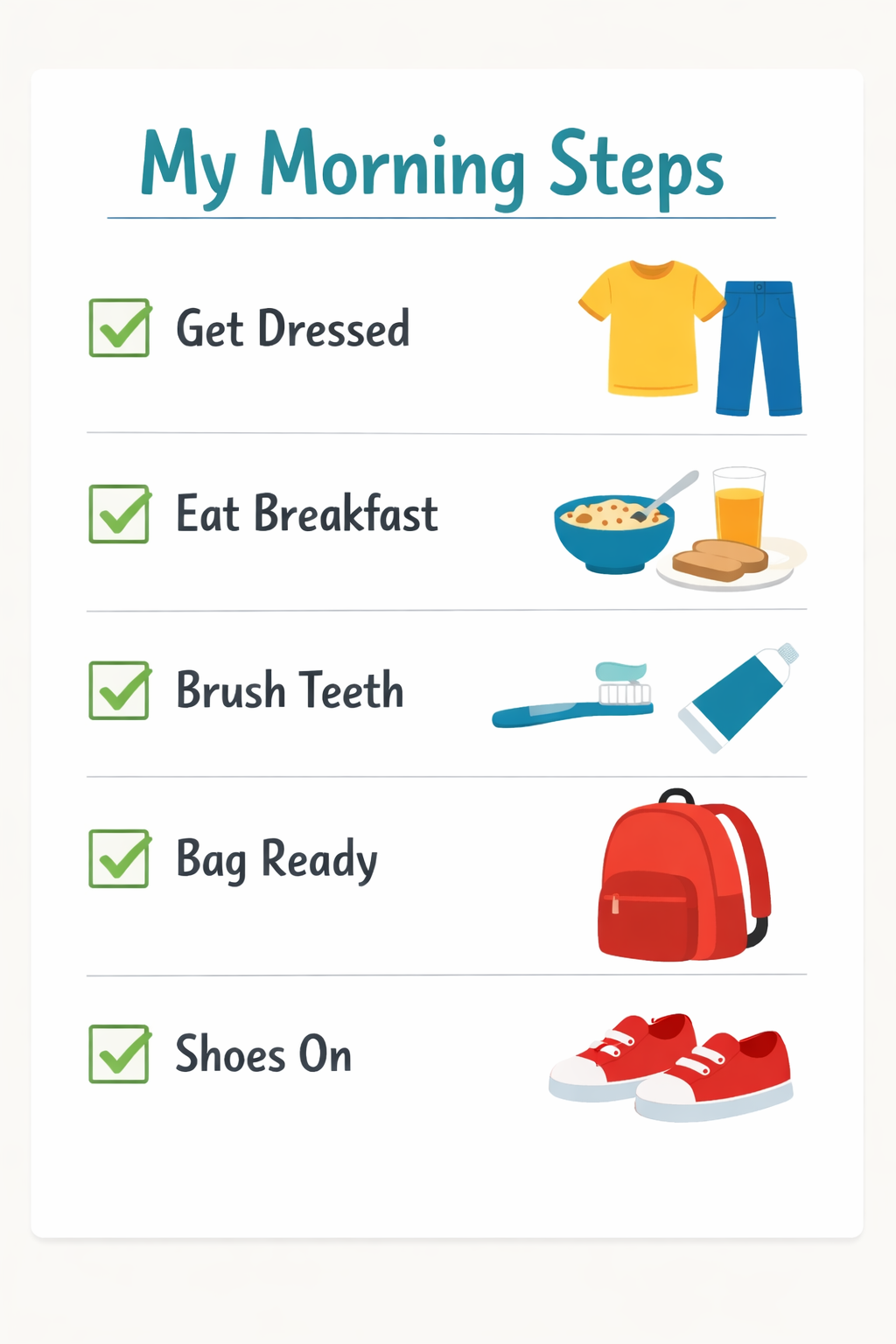
Later in this guide we'll discuss how to make these for managing emotions and setting safety rules as well as step-by-step reminders like this one.
What is a well-structured image prompt?
A simple way to help AI turn your idea into a useful picture
When creating images, AI needs visual guidance, not technical detail.
A helpful image prompt gently answers four questions:
Layout
How the poster is organised on the page
Example: “Wide format with 5 numbered boxes in a simple grid.”
Why this helps:
It prevents clutter and keeps ideas easy for children to follow.
Art Style
The overall look and feel
Example: “Bright 2D digital illustration with clean lines.”
Why this helps:
It keeps images friendly, calm, and age-appropriate.
Message
What the poster is teaching
Example: “Title: ‘Playground Heroes’ with 4 simple rules.”
Why this helps:
It keeps the focus on thinking and behaviour, not decoration.
Presentation
Decorations and mood
Example: “School-style borders, stars, and simple icons.”
Why this helps:
It sets the emotional tone without distracting from the message.
This structure is one helpful way to learn, not the only way to get good results.
Why this matters
Children often understand ideas better when they can see them, especially before or after challenging situations.
A simple poster can:
- act as a reminder without nagging
- support calmer conversations
- give children a shared language for behaviour
- reduce emotional intensity in the moment
You do not need artistic or technical skill.
You only need clarity, care, and judgement.
AI helps you create visuals quickly — you decide what is appropriate, useful, and kind.
Try this: Start with a real parenting task
AI image tools are helpful when you want to:
- prepare a child before a busy situation
- reflect together after a difficult moment
- reinforce family expectations visually
- support emotional regulation
- A typical novice prompt
Using Gemini and ChatGPT Image Generation for free.
At the time of writing this guide, Gemini’s Nano Banana Pro and ChatGPT’s Image 1.5 were the best models for this. Both accounts only allow a few image generations at the highest quality each day. If you receive poor results, especially text errors, it is likely that the chatbot has used a lesser model.
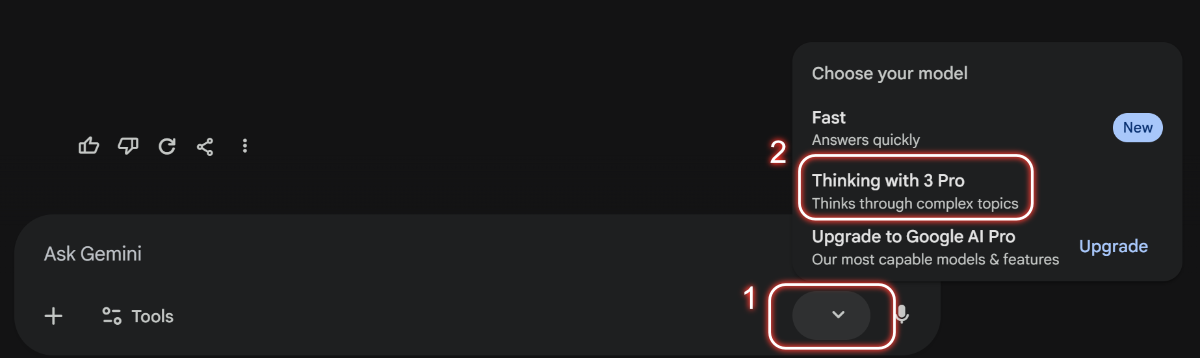
*IMPORTANT TIP: Gemini will not consistently use Nano Banana Pro to generate images unless you set the mode to thinking.
Examples
Outside Rules
Novice:
“Create a park safety poster for kids.”
Skilled Beginner
Layout: Wide poster with 4 illustrated boxes
Art style: Bright 2D illustration, clean lines
Message: Title ‘Safe Fun at the Park’ with rules about staying nearby, taking turns, watching for bikes, and listening to adults
Presentation: Trees, swings, friendly characters, calm colours
Here is the result:
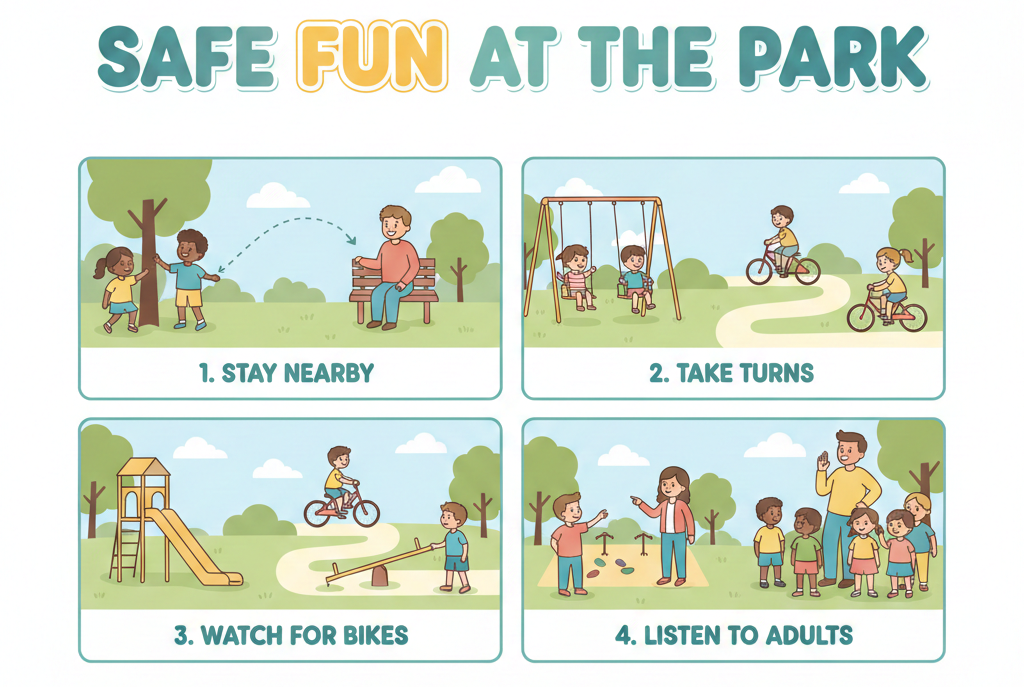
You can share the result for discussion by printing it or showing your child it on a tablet or laptop screen. Print-outs are great for pinning to a visible place, such as a bedroom wall.
Reducing sibling conflict
Novice:
“Make a poster about not fighting.”
Skilled Beginner
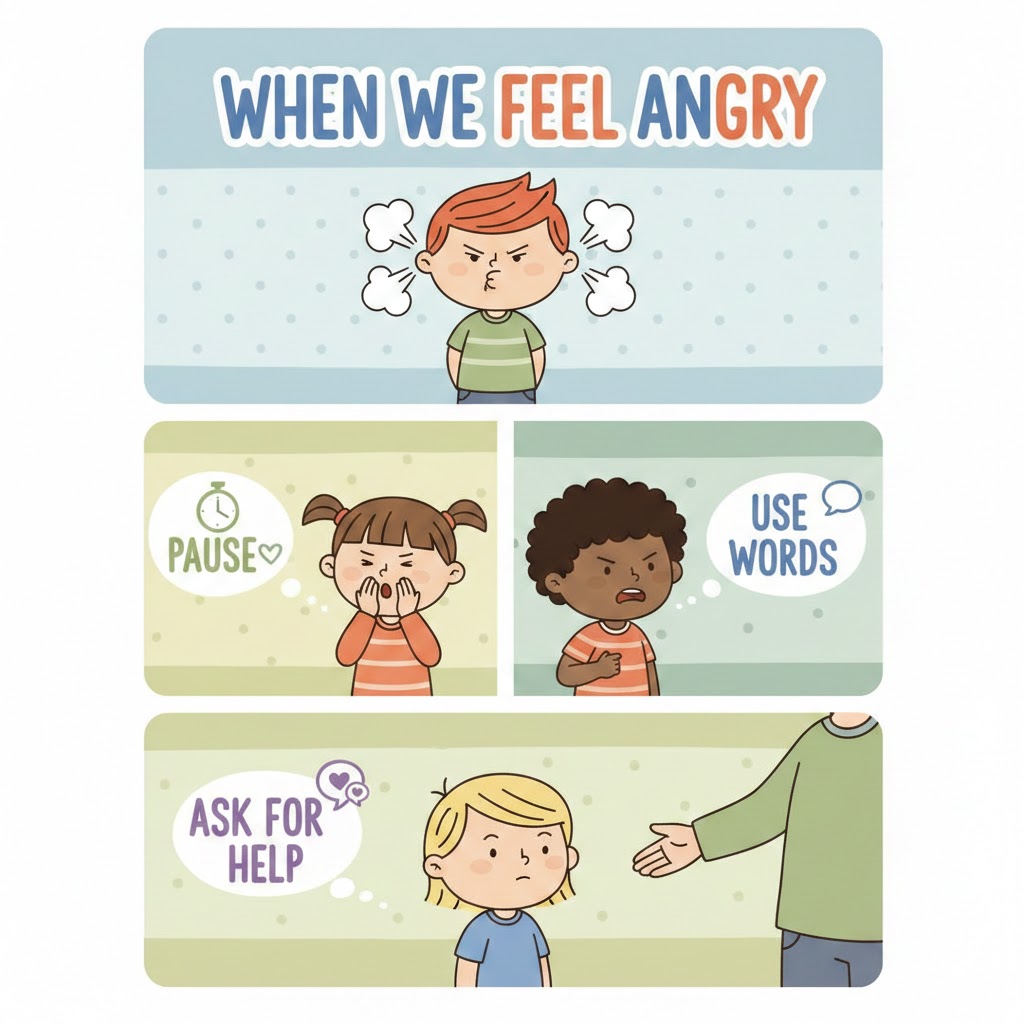
- Layout: Vertical poster with 3 sections
- Art style: Simple cartoon children with clear expressions
- Message: Title ‘When We Feel Angry’ with 3 choices: pause, use words, ask for help
- Presentation: Soft colours, heart and speech-bubble icons
Here is the result:
Morning routine support
Novice:
“Poster to help kids get ready faster.”
Skilled Beginner
Layout: Checklist-style poster with 5 steps
Art style: Flat illustration, minimal detail
Message: Title ‘My Morning Steps’ with dressing, breakfast, brushing teeth, bag ready, shoes on
Presentation: Simple icons, uncluttered background
Playground social skills
Novice:
“Make something about sharing.”
Skilled Beginner
Layout: 4 boxes showing simple scenes
Art style: Friendly digital illustration
Message: Title ‘Playing Together’ with rules about turns, asking, waiting, and kindness
Presentation: Stars, playful icons, positive tone
How to refine an image prompt
Refining works best when you start with a clear structure and then make small, thoughtful adjustments.
You are not fixing mistakes: you are tuning the image to fit your child better.
First structured attempt
Layout: Vertical poster with 4 boxes
Art style: Soft 2D illustration, gentle colours
Message: Title “Calm Down Tools” with 4 steps
Presentation: Simple icons, peaceful tone
Helpful but imperfect result
The poster is clear, but:
- the colours still feel a bit busy
- the characters look older than intended
- the wording feels slightly abstract
This is a good starting point. Now you refine.
Refinement step 1: Adjust the visual tone
“Use fewer colours, rounder shapes, and very simple child-like characters.
Make the overall feeling calm and reassuring.”
Refinement step 2: Adjust age and language
“Limit to 3 steps.
Use very short phrases suitable for a 5-year-old, such as ‘Stop’, ‘Breathe’, ‘Ask for help’.”
Each refinement keeps the same structure while improving clarity, emotional fit, and usefulness.
Small, thoughtful changes often make the poster feel much more right for your child.
Using Your Judgement
AI can generate images quickly, but it does not understand:
- your child’s personality
- emotional triggers
- family dynamics
- developmental readiness
AI may:
- oversimplify emotions
- suggest visuals that feel childish or overwhelming
- miss social nuance
Before using an image, ask yourself:
- Does this feel respectful to my child?
- Is this realistic and supportive?
- Would this help a calm conversation?
- Does it reflect our family values?
AI supports your thinking.
You decide what belongs in your home.
Talking about this with your child
You might say:
“I made this picture to help us remember what works when things get tricky.”
“Let’s look at this together and see if it makes sense to you.”
This keeps the focus on shared understanding, not control.
Tip for parents
Learning to produce good AI images is a multi-purpose skill. You can extend it to help illustrate tricky topics for children or help them visualize scenes in favourite books. Take what you have learned here and apply it to other situations.
Was this guide helpful?
Let us know whether this article helped you.
Share this guide with other parents
Know a parent who would find this guide helpful? Enter their email address and we'll send them the Parent Conversation Guide directly.