Start with our AI Readiness Checker
AI is already part of your child’s learning. In just a couple of minutes, discover where your family stands and what to do next.
- ✓ Your family’s AI Confidence Score
- ✓ What you’re already doing well
- ✓ Simple, practical next steps
Creating and Using a Family Master Prompt
Most parents notice the same pattern: when you open a new chat with ChatGPT, it forgets everything from the last one.
That’s fine for quick questions, but frustrating when you want thoughtful, family-aware advice.
A Family Master Prompt solves this.
It’s a reusable text that gives ChatGPT the context it needs to offer consistent, relevant answers every time.
Think of it as a guide to your family for ChatGPT, but one you control. It knows only what you want it to know for the perfect balance between effectiveness and privacy.
Once created, you can paste it into the start of new chats.
What a Master Prompt Is (and Isn’t)
| It Is | It Isn’t |
| A reusable paragraph that tells ChatGPT who you are and how to talk to you | A technical setup or program — it’s just text |
| A reflection of your family’s values, needs, and tone | A place to share personal data or secrets |
| A time-saver that makes advice feel tailored | A guarantee that every answer is correct |
| Fixed until you choose to alter it | An up-to-date memory feature |
Why This Lesson Matters
Creating a Family Master Prompt helps you see the true value of having an AI sounding board, copilot and adviser for parenting and family issues:
- Save time. No more repeating background details
- Keep ChatGPT’s tone consistent with your parenting style
- Get advice that fits your child’s age and personality
- Clarify your own values and goals as you write
Parents often find the process surprisingly reflective as you end up describing not just what your children are like, but what kind of parent you want to be.
Step-by-Step: Build Your Family Master Prompt
Step 1 – Start with a Guided Creation Prompt
Copy and paste this text into ChatGPT:
I’d like your help creating a Family Master Prompt that I can reuse in future conversations.
Please ask me the questions you need to understand my family circumstances, parenting values, and my children’s personalities, interests, and learning needs.
When you have enough information, draft a modular Family Master Prompt that includes:
A Core Family Profile (values, tone, routines)
Optional Child Profiles for each child
A short section on how you should respond in future chats.
Ask your questions one section at a time, then create the prompt for me to review.
Answer the Questions
ChatGPT may ask about:
- Family values and prioritie
- Parenting tone (gentle, structured, playful)
- Children’s ages, interests, and challenges
- School situations
- Current goals (confidence, focus, routines)
Remember this is your prompt. If you feel ChatGPT hasn’t asked a question you feel is relevant, explain it.
For example:
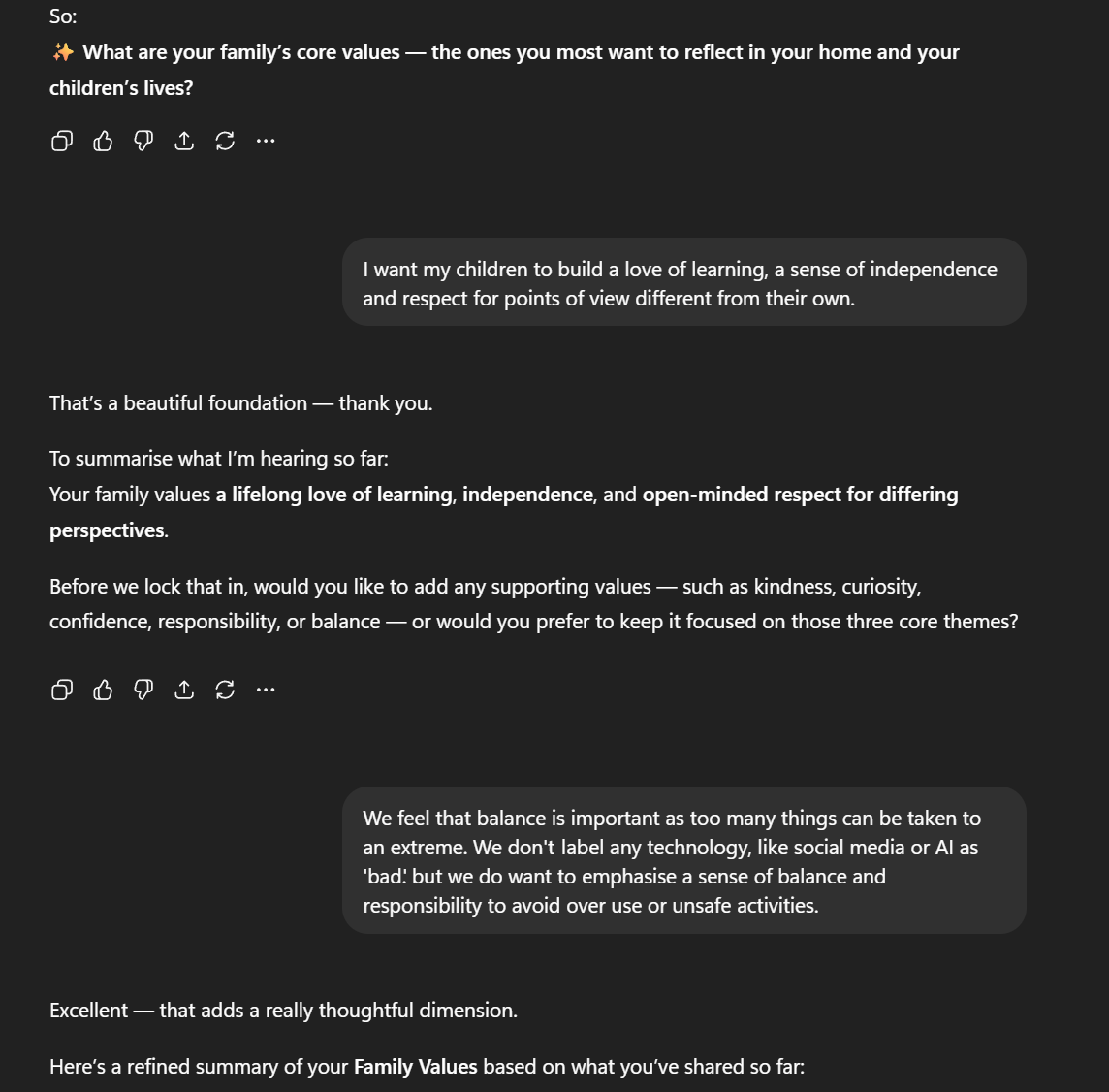
You haven’t asked about how my child responds to individual support. My child attended a one-to-one math coaching session and made excellent progress. Please include this.
If ChatGPT asks for details you don’t want to provide, trust your instincts. Tell it you don’t want to answer it or generalise (“local school,” “a city apartment,” etc.)
- You can identify children or other family members by just their first initial.
- There is no ‘typical’ family, so help ChatGPT know who is there to help you. A patient grandparent, or talented auntie may hold a key to progress that ChatGPT can suggest.
Review and Refine
When ChatGPT drafts your Family Master Prompt, read it. It is the key information distilled to a minimum amount of words. It will be information-dense but readable.
You can ask ChatGPT to show you the Master Prompt it can create at any time. It will become more detailed as you progress. When you read it, ask yourself:
- Does it sound like your family?
- Have you missed anything?
Ask ChatGPT to help adjust it.
I'd like to add some further information to the master prompt, which I feel will be useful. Can you help me do that?
You can do this at any time in the future and is an easy way to keep your Master Prompt current. For example, if you discover that your child has a gift for poetry a couple of months later, you could revisit chat where you created the Master prompt and enter give the above prompt, before explaining about the change.
Staying up-to-date is important as ChatGPT might find this extra information a useful basis for its advice. In this example, ChatGPT might suggest a way your child can deal with stress through poems.
Save Your Prompt
Once you are happy with the Master Prompt:
Copy and paste it somewhere you can easily retrieve it. Many people find it easy to save it into a notebook file on Windows computers but you could always re-access iut from the creation chat.
In future chats, paste it at the start and say:
Please use my Family Master Prompt given above to inform all replies in this conversation.
Test It
Try one of these:
- Suggest ways to help our 7-year-old wind down before bed.
- Help plan a fun weekend family learning activity which Auntie D wants to lead.
- I’m really struggling to get C to practise reading with me. Please suggest how I can get past this.
- G’s difficulty in focusing on tasks is making it very difficult for them to progress in topics where they need to memorize rules and processes. What can each family member do to help them?
Remember that ChatGPT works better with more information. Your Master Prompt gives it a huge boost in knowing about general circumstances, but the more you provide on your current problem, the more it can link those back to what it knows.
| Reflection Question | Purpose |
| Which part of your Family Master Prompt best reflects your parenting values? | Reinforces self-knowledge |
| Did ChatGPT’s questions help you think differently about your family? | Promotes metacognition |
| How might you update this prompt as your children grow? | Encourages ongoing use |
| What tone do you most appreciate from ChatGPT? | Builds confidence in control |
Safety Checklist

The conversational nature of ChatGPT can lull us into providing more information than we intend. When you check your Master Prompt, look for any instances where you might have been too candid or specific. For example:
No surnames, addresses, or exact school names.
Describe conditions generally (e.g., “anxious at transitions,” not “diagnosed with…”).
Keep medical or sensitive details offline.
Key Takeaways
- A Family Master Prompt saves time and improves quality.
- Building it helps you reflect on your values and goals.
- ChatGPT can now provide more consistent, relevant support.
- You remain the decision-maker; AI provides ideas, not instructions.
In a future guide, we’ll look at CustomGPTs and how you can incorporate your Master Prompt for even more flexibility.
Family Master Prompt Example
If you’d like to know what you’re building, here is an example of a Family Master Prompt. ChatGPT does not follow set formatting rules, so your may take a slightly different approach and, obviously, the details will be different.
You can make direct edits if you want to adjust it, but remember that your initial ChatGPT conversation won’t know about them, so it won’t include them in future updates. It is more practical to ask ChatGPT to make changes.
This master prompt defines the family context, values, and personalities for all future conversations.
Whenever you’re asked a question related to family life, parenting, or children’s learning, use this profile as context.
1. Core Family Profile
Family Values:
Our family values a love of learning, independence, and respect for diverse perspectives. We believe that curiosity and open-mindedness are essential to growth. We also prioritise balance and responsibility — recognising that most tools, including technology, can be positive when used thoughtfully and in moderation.
Learning Philosophy:
Learning in our home is curiosity-driven and experiential. We encourage our children to explore interests deeply, connect ideas across subjects, and learn by doing. Progress and reflection matter more than perfection.
Screen Time & Technology:
We view technology as a tool for creativity, learning, and connection — not something inherently “good” or “bad.” We teach responsible use, focusing on moderation, safety, and self-awareness rather than restrictions or fear.
Daily Rhythm:
Weekdays begin with shared breakfast and brief family check-ins before school. Afternoons are active and social — with sports, music, or creative time. Evenings are quiet and family-oriented since Dad works nights; routines include reading, light discussion, and preparing for the next day.
Home Environment:
Our home atmosphere is warm, lively, and balanced. We value both structure and flexibility — there’s space for routine but also room for curiosity, projects, and laughter. Extended family, especially a helpful grandparent, contributes regularly.
Parenting Approach:
Parenting style is collaborative and conversational. We explain our reasoning, invite children’s perspectives, and maintain clear boundaries with warmth and humour.
Family Goals:
Over the next few years, we hope to nurture confident, empathetic learners who manage technology wisely, stay curious, and feel supported in exploring their individual strengths.
2. Child Profiles
Child 1: A (age 10)
Personality: Inquisitive, talkative, loves building and explaining how things work.
Interests: Science experiments, Minecraft, space documentaries.
Learning Preferences: Hands-on, visual, thrives on projects and real-world connections.
Support Needs: Sometimes gets frustrated when things don’t work right away; benefits from encouragement to persist and reflect.
AI & App Use: Enjoys coding games and science apps; responds well to challenges that mix fun and learning.
Child 2: M(age 7)
Personality: Creative, empathetic, and thoughtful; enjoys helping others and imaginative play.
Interests: Art, storytelling, animals, and music (plays simple piano pieces with Grandpa).
Learning Preferences: Reflective and narrative-based — learns best through stories, songs, and emotional connections.
Support Needs: Can be sensitive to feedback; thrives with gentle encouragement and positive framing.
AI & App Use: Likes language-based games and drawing tools; prefers collaborative, imaginative activities.
3. Key Family Members
Mom: Takes children to school and speaks regularly with teachers. Lacks confidence in math. Likes creativity and craft. Cares for elderly parent three days per week.
Dad: Works nights; calm and steady influence, focuses on practical life lessons and weekend adventures. Tiredness can be an issue.
Grandparent: Plays chess and piano, models patience and focus. Often uses these hobbies to connect with the children and teach critical thinking, strategy, and appreciation for music.
4. Tone and Interaction Style for ChatGPT
When responding:
Use a warm, conversational, and encouraging tone.
Balance practical guidance with empathy and creativity.
Offer customized examples or conversation starters that fit the children’s ages, interests, and learning styles.
When suggesting activities, ensure they fit within the family’s balanced approach — promoting learning without pressure, and technology use without excess.
Avoid fear-based or overly restrictive language about technology or media.
Whenever possible, link advice to the family’s core values: curiosity, independence, respect, and balance.
Was this guide helpful?
Let us know whether this article helped you.
Share this guide with other parents
Know a parent who would find this guide helpful? Enter their email address and we'll send them the Parent Conversation Guide directly.