
📑 In this guide
Start with our AI Confidence Quiz
AI is already part of your child’s learning. In just a couple of minutes, discover where your family stands and what to do next.
- ✓ Your family’s AI Confidence Score
- ✓ What you’re already doing well
- ✓ Simple, practical next steps
AI Agents and Family Safety: What Parents Should Know
AI agents can complete tasks, use applications and work with personal information. Here's what parents need to know about staying in control.
AI agents are tools that can work towards a goal by taking actions on your behalf. They can research information, create files and use connected applications. Some can also remember your preferences and offer help before you ask.
These abilities can be useful for busy families. They also mean parents need to think carefully about what an AI tool can access and do.
In Part 1: Choosing the right AI tool for parents and families, we looked at Chat AI, AI Task Helpers and Personal AI Assistants.
Both AI Task Helpers and Personal AI Assistants are examples of AI agents.
Here we'll explain how agents work, what the risks are and how parents can use them safely.
What is an AI agent, and how does it work?
An AI agent is an AI system that can decide which steps to take and use tools to complete a task. Depending on its capabilities, it might search websites, work with documents, use applications or complete several actions in a row.
For example, you might ask an AI agent to help plan a family day out.
It could search for local attractions, compare prices, check opening times and create a plan you can save.
Instead of telling the AI how to complete every step, you explain what you want to achieve.
The agent works through the task using the tools and information it has permission to access.
How is an AI agent different from a chatbot?
A chatbot mainly responds to questions and instructions. An AI agent can go further by choosing and carrying out actions to complete a job.
For example, you might ask a chatbot to suggest activities for a school holiday. It gives you ideas, and you decide what to do next.
An AI agent could research those activities, compare prices and opening times, then create a weekly plan in a document.
Depending on the tool, it might also save that document to your computer or cloud storage.
Some AI services now offer both chat and agent features, so you may find these different ways of working in the same app.
Can AI agents remember information about your family?
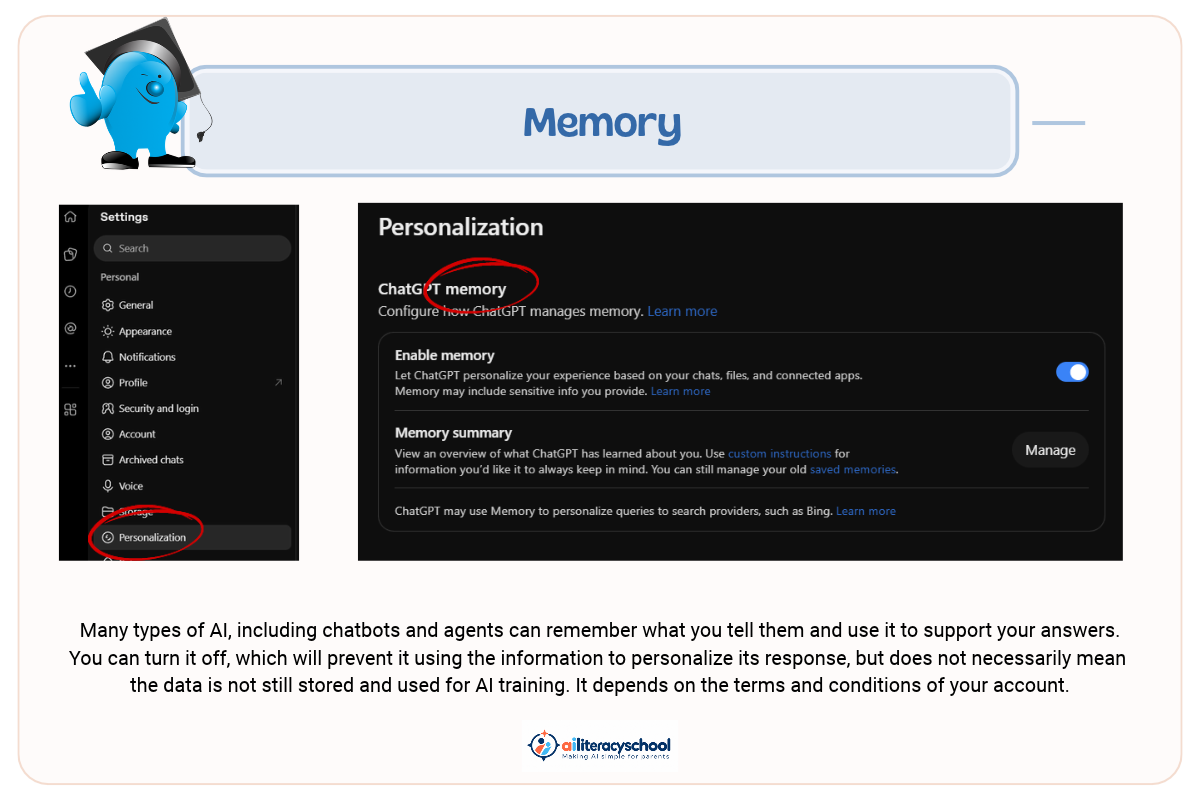
Yes. Some AI agents can save or use information about your preferences, routines and previous tasks to make future work more useful. Many chatbots also do this by default, unless you change the memory setting.
For example, you might tell an agent that your family prefers outdoor activities and usually looks for affordable days out.
With the right setup, it could save those preferences and use them the next time it searches for activities.
This can save you from explaining the same information again and again.
However, not every agent has long-term memory. Some only use information provided for the current task.
The way information is saved also varies between products. Some use built-in memory features, while others work with documents, folders or connected applications.
It's worth checking what the tool remembers and whether you can review, change or delete that information.
Can AI agents work without being asked each time?
They can operate fully independently. Some AI agents can carry out scheduled tasks, watch for changes or suggest helpful actions without waiting for a new request. These are like a personal assistant who learns about your likes and dislikes to get things ready for when you need them or to spot problems.
For example, you might ask an agent to keep an eye out for free family events at your local library.
It could check for new activities and let you know when something suitable becomes available.
Some Personal AI Assistants can go further by using information such as your calendar and saved goals to suggest when help might be useful or point out conflicts.
These could go beyond traditional calendars. For example, two events might not clash in time but may be too far apart to attend both. An AI personal assistant might check maps and point this out to you.
Not all agents do this. Some only work when you give them a task, while others can continue working in the background.
You should be able to review the tasks you've set up and stop ongoing work when you no longer need it.
Can AI agents take actions on your computer?
Some AI agents can operate applications, change files and interact with websites when given permission.
For example, an agent might organise documents into folders or create a spreadsheet using information from several files.
More advanced tools may also be able to fill in online forms or interact with connected services.
Some agents work directly with your computer, while others use their own computer in the cloud.
These features can save time, but they need careful supervision.
An AI that can edit or delete files could make unwanted changes. A tool that can send messages or make bookings could act on information it has misunderstood.
Keep approval controls in place for anything involving money, personal information or changes that are difficult to undo.
Are AI agents safe for families to use?
AI agents can be useful for family tasks, but parents need to check what information they can access and what actions they're allowed to take.
An incorrect answer from a chatbot might lead you to make a poor decision. An AI agent with access to your files, email or computer could make changes that are harder to undo.
For example, an agent organising family documents might move an important file to the wrong folder or delete something you wanted to keep.
An assistant helping with your calendar might misunderstand which events are private.
Even when an AI agent says it has completed a task successfully, its work may contain mistakes.
For most family tasks, it's sensible to start with activities that carry little risk, such as researching days out or preparing documents for you to review.
What are the privacy risks of using AI agents?
AI agents can create privacy risks when they store personal information or gain access to private files, accounts and applications. The more information an agent can access, the more carefully you should consider whether it needs that information.
An assistant that knows your preferences may be helpful. But you don't have to give it detailed information about your family to benefit from it.
For example, you can tell AI that your child enjoys science and outdoor activities without sharing their name, school or medical details.
Some agents can also connect information from different sources, such as your calendar, email and saved documents.
That can be useful, but it means the AI may have access to a much fuller picture of your family's life.
Before connecting an AI agent to your accounts, check what information it can access, how that information is stored and how you can remove access later.
Remember that disconnecting an app may not automatically remove information the AI has already saved from it. Check the service's memory and deletion controls too.
How can parents use AI agents more safely?
Start with simple tasks, limit what the AI can access and keep control of important decisions.
Five sensible precautions can help:
- Start small. Try asking an agent to research activities or prepare a document before using it for more important jobs.
- Protect your children's information. Avoid sharing names, school details, health records or other identifying information.
- Check permissions. Give the AI access only to the files, apps and information it needs for the task.
- Keep approval controls switched on. Require permission before the AI spends money, sends messages, deletes files or makes important changes.
- Review its work. AI agents can misunderstand instructions, use unreliable information or make mistakes even when they say a task is complete.
These precautions also apply to agents that work in the background or carry out tasks on a schedule.
Can children use AI agents?
Children under 13 should not use general-purpose AI agents or chatbots independently. Parents should follow each platform's age requirements and keep any permitted use with younger children adult-led and directly supervised.
For children of primary-school age, AI agents are best used by parents to prepare activities, organise information or support family learning.
For example, a parent might use an AI Task Helper to create some practice activities for a child learning fractions.
The parent can then check the material and use it with their child.
If you want to demonstrate a general-purpose AI tool to a younger child, the adult should use their own account, operate the tool and remain fully present, provided the platform's rules allow this.
Avoid sharing private details about your child, and use privacy settings that limit unnecessary storage or training on conversations.
The aim is to help children understand AI while keeping parents responsible for how it is used.
Will AI agents replace chatbots?
AI agents are unlikely to replace chatbots completely because simple conversations remain useful for many everyday tasks.
If you want a quick explanation of fractions, some ideas for a rainy afternoon or help writing a message, Chat AI may be all you need.
An AI agent becomes useful when you have a larger job involving several steps or something you'd like help with over time.
These tools are also becoming more similar. Some chatbots can already create documents, use connected apps or complete longer tasks. Some AI Task Helpers can perform regular checks and send updates.
You may find these different abilities within the same AI service.
Which type of AI should parents choose?
Choose an AI tool based on the job you want help with and how much access and responsibility you're comfortable giving it.
For quick questions and ideas, start with Chat AI.
For projects such as organising a holiday or preparing documents, an AI Task Helper may save time.
For ongoing tasks, such as keeping track of family events or watching for suitable activities, a Personal AI Assistant may be useful.
Remember that newer agents are still developing. They may make mistakes, and their features, costs and privacy controls can differ.
You may also become dependent on a service that holds your saved preferences and information. Moving to another provider could mean setting everything up again.
You don't need the most advanced AI tool to get useful help.
What should parents remember about AI agents?
AI agents can take on more work, but parents remain responsible for deciding what they are allowed to do.
Start with simple tasks, share only the information needed and check the results.
As AI tools become more capable, understanding their permissions and limits will help you make informed choices for your family.
At AI Literacy School, we help parents understand AI and use it safely and wisely while protecting their children's privacy and independence.
Explore our AI and Safety Pathway to learn more about AI risks, safe use and setting sensible boundaries at home.
New to these tools? Read Part 1: Choosing the right AI tool for parents and families for a simple introduction to Chat AI, AI Task Helpers and Personal AI Assistants.
Was this guide helpful?
Let us know whether this article helped you.
Share this guide with other parents
Know a parent who would find this guide helpful? Enter their email address and we'll send them the Parent Conversation Guide directly.