Start with our AI Readiness Checker
AI is already part of your child’s learning. In just a couple of minutes, discover where your family stands and what to do next.
- ✓ Your family’s AI Confidence Score
- ✓ What you’re already doing well
- ✓ Simple, practical next steps
Muse has reached number one in the US App Store’s free iPhone chart. For parents juggling school emails, clubs and the weekly shop, its appeal is easy to understand: help getting everyday jobs done.
What is Muse?
Muse is Meta’s personal AI agent. You describe what you need in ordinary language, and it can work through the steps to help you complete a task.
That might involve finding information, organising plans or taking action through services you connect. How much it can do depends on the access you give it and the services it supports.
Three ways parents could use it
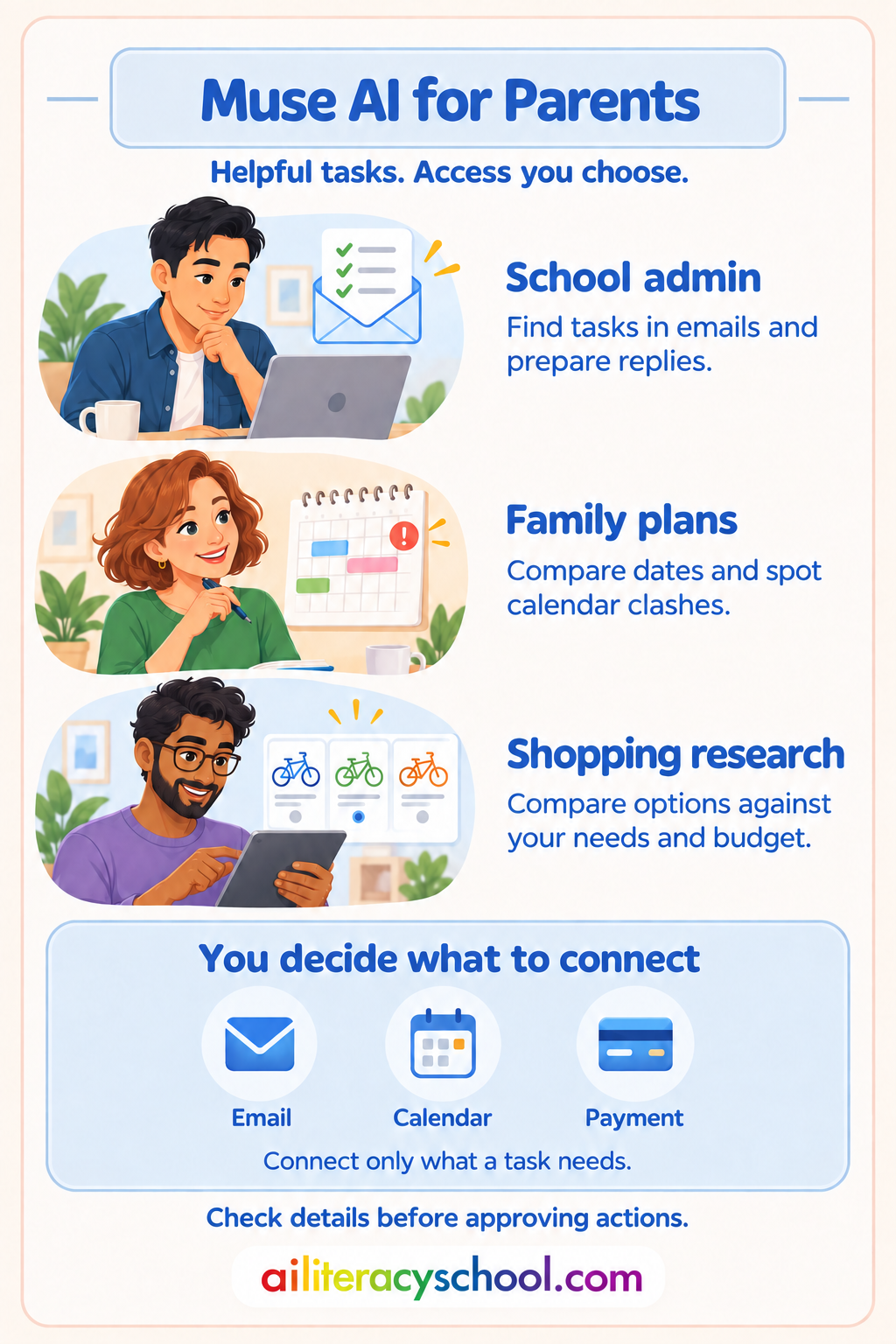
1. Keep track of school admin
Ask Muse to check connected emails for things you need to act on, such as a trip deadline or a request to bring something into school. It could help you organise those tasks and prepare replies for you to check.
2. Make family plans easier
Finding a time for a family visit can involve several calendars and a long exchange of messages. Muse could help identify suitable dates, check for clashes and draft a plan. You make the decisions; it helps with the organising.
3. Cut down time spent comparing purchases
If your child needs a new bike, you could ask Muse to compare options against a budget and your requirements. It could help narrow the choices and, where supported and authorised, assist with buying your choice. You would still need to check suitability, price and delivery details.
Choose what you share
To handle tasks through your accounts, Muse needs access to personal services such as email and calendars. Buying something may also require access to a payment method. Remember that your accounts can contain information about your children and other people too.
You don’t have to grant all that access. You can start with research or planning, then decide whether connecting a service would be useful. Like a human helper, an agent needs the means to pay before it can buy something for you.
Before connecting an account, check what Muse will be allowed to read or change. Review its privacy settings and approval requests, and disconnect services you no longer need.
Start with a small task whose result you can easily check. If correcting its work takes longer than doing the job yourself, it may not be useful for that task yet.
Take the next step
Read our guide to keeping your child’s data safe before connecting family information. When choosing AI tools for your child’s learning, follow our Choosing AI Tools pathway for a practical way to assess them.
Was this guide helpful?
Let us know whether this article helped you.
Share this guide with other parents
Know a parent who would find this guide helpful? Enter their email address and we'll send them the Parent Conversation Guide directly.