Start with our AI Readiness Checker
AI is already part of your child’s learning. In just a couple of minutes, discover where your family stands and what to do next.
- ✓ Your family’s AI Confidence Score
- ✓ What you’re already doing well
- ✓ Simple, practical next steps
Many parents are curious about using AI tools like ChatGPT and Gemini to support learning, planning, and everyday family life, but they are also understandably worried about privacy.
Both tools now offer something called a temporary chat. This feature is designed to give you more control over what is saved, remembered, or used to improve the AI.
Below, we answer the most common questions parents ask, using real parenting examples and plain language.
What is a “temporary chat”?
A temporary chat is a conversation that is not saved in your regular chat history and is designed to limit long-term memory and learning from that conversation.
Why this matters for parents:
Temporary chats are helpful when you want quick support without creating a long record tied to your account. For example:
- Asking for help explaining a homework topic once
- Getting parenting advice on a sensitive issue
- Reviewing a document or message you do not want saved
Is a temporary chat the same in Gemini and ChatGPT?
No. This is very important.
The idea is similar, but the privacy rules are different, and parents should not assume they work the same way.
This is why reading the on-screen warnings before starting a temporary chat really matters.
How do temporary chats work in ChatGPT?
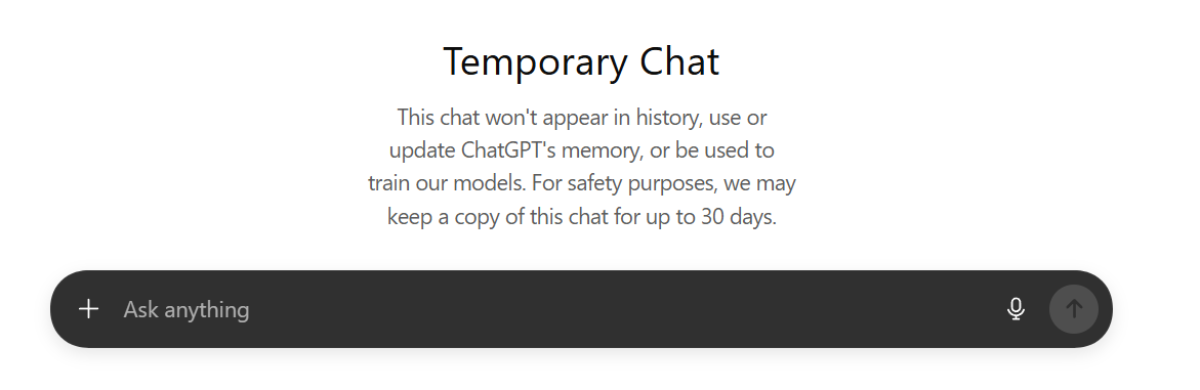
ChatGPT Temporary Chat means:
- The chat does not appear in your history
- ChatGPT does not remember the conversation later
- The chat is not used to train or improve ChatGPT’s models
- For safety reasons, a copy may be kept for up to 30 days, then deleted
What this means for parents:
You can use ChatGPT temporary chat like a clean slate.
Parenting examples:
- Asking how to explain fractions to a 9-year-old
- Getting help writing a calm message to a teacher
- Talking through a one-off parenting challenge
- Exploring a topic your child asked about without it shaping future answers
We include a series of scenarios and why you might want to make them temporary chats at the end of this How-To.
Where to click:

Look for a dashed speech bubble icon in ChatGPT at the top right of the screen.
How do temporary chats work in Gemini?
Gemini’s temporary chats are closer to an incognito mode, but parents need to read the warning carefully.
Key points parents should know:
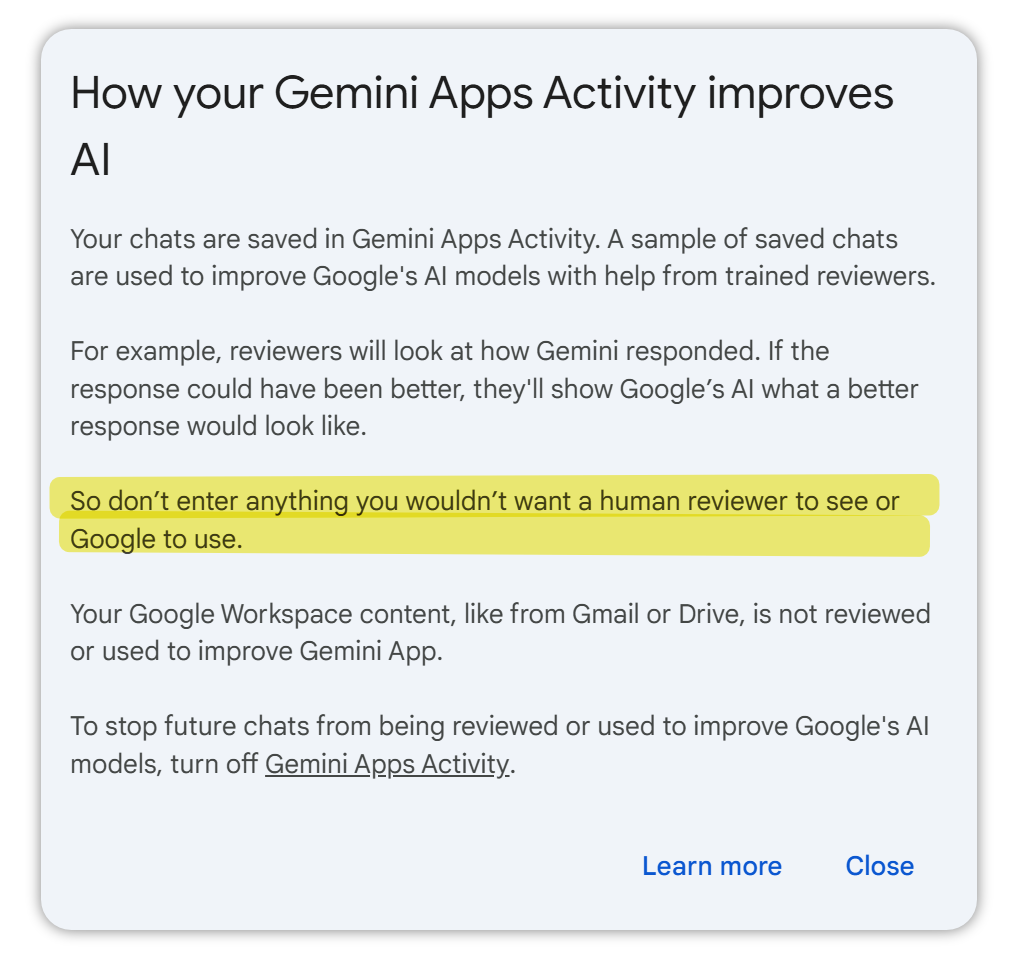
- Regular Gemini chats are saved in something called Gemini Apps Activity
- Some saved chats may be reviewed by humans to improve Google’s AI
Temporary chats are designed not to be saved or used for training - Gemini may keep the temporary chat available for a short time (for example, up to a few days) so you can return to it
- After that, it is deleted
Most important warning from Google:
If Gemini Apps Activity is turned on, do not enter anything you would not want reviewed or used.
This warning appears for a reason, and parents should pause and read it before starting.
Where to click:

Can Gemini temporary chats still be reviewed by humans?
Temporary chats are designed not to be used to train Google’s AI, but parents should understand the difference between:
- Regular chats (which may be saved and reviewed)
- Temporary chats (which are more private, but not magical or anonymous)
This is why Google strongly advises users not to enter information they would not want reviewed or used, unless they are confident they are in a temporary chat and understand their settings.
When should parents use a temporary chat?
Temporary chats are especially helpful for one-time or sensitive situations.
Examples parents often find useful:
- Helping a child understand a confusing homework question
- Asking for age-appropriate explanations of news events
- Reviewing a school email before responding
- Checking a form, contract, or school policy
- Talking through parenting strategies without creating a long history
If you want AI to remember preferences or build ongoing support, a regular chat may make more sense. If you want privacy and a clean slate, temporary chat is usually the better choice.
Should children use temporary chats?
For younger children (0–14):
- Parents should be the primary users of ChatGPT and Gemini
- Temporary chats can be a safer way for parents to explore questions on a child’s behalf
- Children should not be encouraged to use these AI tools independently without guidance
Temporary chats are a parent tool, not a substitute for supervision or discussion.
What should parents do before starting a temporary chat?
This is the most important takeaway.
Before you type anything:
- Read the warning message on the screen
- Check whether the chat is clearly marked “Temporary”
- Understand what is saved, reviewed, or deleted
- Avoid sharing names, addresses, medical details, or identifying information
Temporary does not mean risk-free. It means more control when used thoughtfully.
Summary
AI tools like ChatGPT and Gemini can be powerful helpers for learning, planning, and parenting when used wisely.
Temporary chats exist to give families choice and control, not to remove responsibility. Parents who take a moment to read the warnings, understand the differences, and model safe use are already doing the most important work: building confident, informed AI literacy at home.
If you are curious, cautious, and involved, you are using AI exactly as it should be used.
Scenarios: When a Temporary Chat Makes Sense for Families
Temporary chats are not something parents need to use all the time. They are most useful in specific situations where privacy, clarity, or simplicity matter.
Here are common family scenarios, with clear reasons why a temporary chat is often the best choice.
Scenario: Answering a one-off homework question
Why temporary chat helps:
It avoids clogging up your chat history with a question you will never need again.
Parent example:
Your child asks, “What does this word mean?” or “How do you solve this type of math problem?” You get a clear explanation, help your child, and move on. There is no need to save it or build long-term memory around it.
Scenario: Asking for parenting or behaviour advice
Why temporary chat helps:
It keeps sensitive topics out of your visible chat history.
Parent example:
You ask for advice about managing tantrums, sibling conflict, anxiety, or screen-time struggles. If your child later uses the same AI tool on your device, you may not want them scrolling past those conversations.
Scenario: Talking through a sensitive family situation
Why temporary chat helps:
It limits long-term records tied to emotional or personal moments.
Parent example:
You are processing a school issue, friendship problem, or family change and want neutral guidance. Temporary chat lets you think out loud without turning a vulnerable moment into a permanent record.
Scenario: Helping draft a message to a teacher or school
Why temporary chat helps:
It keeps professional and emotional communication separate from everyday family chats.
Parent example:
You ask the AI to help you word a calm email about homework load, classroom behaviour, or learning support. Once sent, the conversation no longer needs to exist.
Scenario: Asking questions your child does not need to see
Why temporary chat helps:
It gives parents a private thinking space.
Parent example:
You ask how to explain a difficult topic in an age-appropriate way before talking to your child. Temporary chat allows you to prepare without exposing your uncertainty or planning process later.
Scenario: Reviewing a document or form
Why temporary chat helps:
It reduces the chance of personal information becoming part of long-term AI memory.
Parent example:
You paste in a school policy, permission form, or camp information and ask, “Can you summarise this for me?” Once you understand it, there is no reason to keep that data attached to your account.
Scenario: Exploring a topic you are curious about but will not revisit
Why temporary chat helps:
It keeps your saved chats meaningful and organised.
Parent example:
Your child asks about a slang word, a viral trend, or a news story you are not familiar with. You get context, answer their question, and move on.
Scenario: Using AI on a shared family device
Why temporary chat helps:
It prevents crossover between adult and child use.
Parent example:
If children occasionally use the same tablet or laptop, temporary chats help ensure they do not accidentally encounter adult conversations, worries, or planning notes.
A simple rule of thumb for parents
- Use regular chats when you want ongoing support, long-term projects, or learning plans.
- Use temporary chats when the question is one-time, sensitive, personal, or not something you want saved or seen later.
And always pause to read the warning message before you start, so you understand exactly what is and is not saved.
Was this guide helpful?
Let us know whether this article helped you.
Share this guide with other parents
Know a parent who would find this guide helpful? Enter their email address and we'll send them the Parent Conversation Guide directly.