
📑 In this guide
Start with our AI Confidence Quiz
AI is already part of your child’s learning. In just a couple of minutes, discover where your family stands and what to do next.
- ✓ Your family’s AI Confidence Score
- ✓ What you’re already doing well
- ✓ Simple, practical next steps
The 30-Minute Back-to-School AI Setup for Families
Back-to-school preparation usually means checking uniforms, finding lunch boxes, sorting clubs and getting everyone back into a routine.
This year, add one more check: how your family will handle AI.
Your child may hear about AI at school, see AI features inside apps or watch other children using chatbots. You do not need to understand every new tool. You do need to make sure your child knows which tools they can use and what safe AI use looks like.
If you already know where you need support, these learning pathways will help you take the next step.
Explore Choosing the Right AI App for Your Child
Explore Healthy Learning and Practical AI
Explore Using AI to Support Additional Needs
First, set the safety baseline
Children should not use AI tools that are intended for older users.
Age limits and account rules matter. If an AI service is not designed or permitted for your child’s age, they should not have their own account or use the tool independently.
Before starting the checklist, check that your child has understood this.
Try asking:
- “Have you seen other children using AI or chatbots?”
- “Do you know whether you are allowed to use those tools yourself?”
- “What would you do if someone suggested an AI app or website to you?”
- “Do you know that you can always ask me before trying something new?”
Make the family expectation clear:
If a tool is intended for older users, your child does not use it on their own.
For primary-school-aged children, the AI activities in this guide are parent-led.
You might use AI yourself to help you plan, understand information, prepare questions or think through a family learning problem.
At other times, you may choose to use AI together as a directly supervised, shared activity, where the service rules allow this. You remain present, use your adult account, guide what is entered and discuss the response with your child.
Shared activities give you a chance to model safe, ethical and effective AI use.
You can show your child how to:
- Protect private information.
- Question an AI answer instead of automatically trusting it.
- Check important information elsewhere.
- Use AI to support thinking rather than avoid it.
- Respect school rules and other people’s work.
- Notice when AI is unnecessary or unsuitable.
- Keep their own thinking and judgement involved.
Your child can start learning these habits long before they are ready to use general-purpose AI more independently.
With this safety baseline in place, thirty minutes is enough to set up a few useful habits for the new school year.
By the end of this checklist, you will have:
- Checked that your child understands your family’s AI safety boundary.
- Checked what your child’s school expects around AI.
- Set a simple family rule for AI use.
- Reviewed the AI apps and tools your family may be using.
- Agreed how AI should and should not support schoolwork.
- Thought about the learning routine your child needs this term.
- Identified one useful next step for your family.
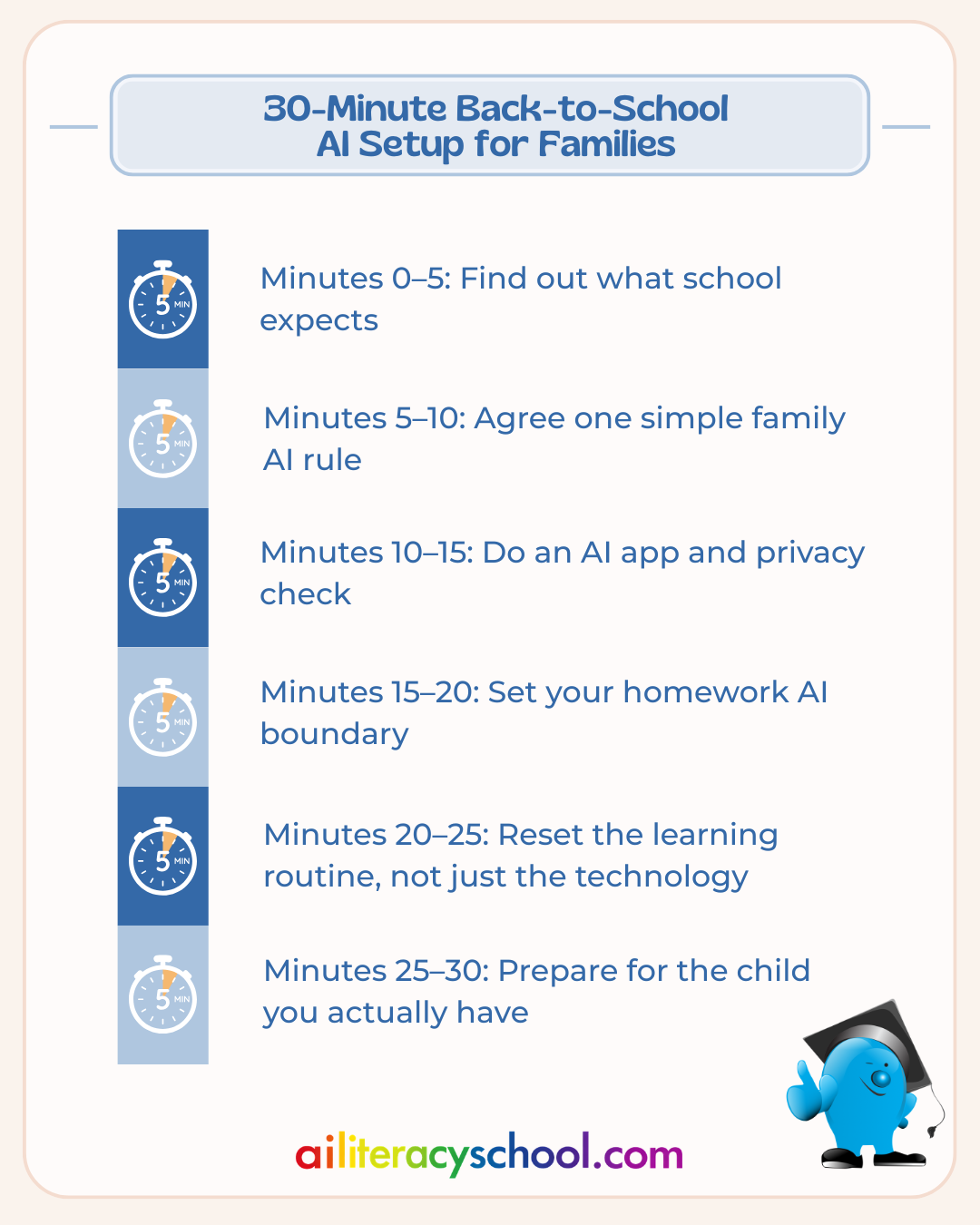
Set a timer and work through one section every five minutes.
You may find this guide useful: Learn how you can support family AI literacy for parents and kids.
Minutes 0–5: Find out what school expects
Start with schoolwork, where AI rules are likely to affect day-to-day decisions.
Schools and teachers may have different expectations about when AI can be used, which tools children may access and what counts as acceptable support.
Find out what your child has been told.
Your five-minute checklist
☐ Look through your school’s homework, digital learning or acceptable-use guidance.
☐ Search recent school emails for terms such as AI, ChatGPT, homework, digital learning or academic honesty.
☐ Ask your child: “Has your teacher said anything about using AI for schoolwork?”
☐ Check whether any school-recommended AI tools are appropriate for your child’s age.
☐ If the guidance is unclear, add it to your list of questions for the teacher.
Check what your child has understood too.
A classmate may talk about using a chatbot at home. Your child needs to know that another child using a tool does not make it suitable or permitted for them.
A useful family principle is:
We follow the school’s rules, respect age limits and use AI in ways that support learning.
Try saying
“Different tools and different school tasks can have different rules. If we're unsure, we'll check.”
Minutes 5–10: Agree one simple family AI rule
Long lists of technology rules are hard to remember. Start with one clear expectation.
Your child should not independently use general-purpose AI tools intended for older users.
If there is a useful reason to involve AI in a family learning activity, you lead it.
A simple family rule could be:
“If we use AI together, an adult stays involved and we talk about what it gives us.”
That means you are present, using your account and actively guiding the activity.
During a shared activity, model questions such as:
- Why are we using AI here?
- Is AI the right tool for this?
- Could this answer be wrong?
- How could we check it?
- Are we sharing anything private?
- Is this helping us think?
- Could we do this ourselves instead?
Your five-minute checklist
☐ Make sure your child knows they should ask before trying a new AI tool.
☐ Explain that age limits and account rules need to be respected.
☐ Decide how you will handle general-purpose AI tools in your family.
☐ Explain that AI answers need to be questioned and checked.
☐ Agree what your child should do if an unfamiliar AI feature appears inside an app they already use.
These conversations give your child repeated examples of thoughtful AI use while you remain responsible for the tool.
Minutes 10–15: Do an AI app and privacy check
Back-to-school season often brings new apps: maths practice, reading support, homework platforms, writing tools, study apps and school-recommended services.
Some now include AI features even if they are mainly presented as learning apps.
Start by asking:
“Is this app designed and permitted for a child of this age to use?”
There is an important difference between an educational app designed for children and a general-purpose AI service intended for older users.
A colourful interface or child-friendly language does not necessarily mean a service is suitable for children.
Pick the one or two learning apps most likely to become part of your child’s routine this term.
Check each app
☐ Who is the app designed for?
☐ What are its age requirements?
☐ What is it meant to help my child learn?
☐ Does it contain AI-powered features?
☐ Does my child need an account?
☐ What information are we being asked to provide?
☐ Does it collect voice, images or information about learning activity?
☐ Does it give hints and explanations, or mainly provide answers?
☐ What parent controls or supervision does it require?
☐ Does its use fit the rules set by school?
Do not treat a general-purpose AI tool intended for older users as a child learning app.
You can use an appropriate AI tool yourself as the parent. If your child joins you in an activity, make sure the service rules allow it and stay directly involved throughout.
A useful learning test
Ask yourself:
“Is this app helping my child become more capable, or simply helping them finish more quickly?”
A correct answer, polished paragraph or completed worksheet does not necessarily show that useful learning has happened.
Go further: Choosing the Right AI App for Your Child
If new learning apps are on your back-to-school list, the Choosing the Right AI App for Your Child pathway gives you a repeatable way to assess them.
Across six short lessons, you explore age suitability, learning value, privacy, supervision, cost and how much of the thinking the app leaves to your child.
It also helps you look beyond child-friendly design and check who an app is actually intended for before signing up.
Explore Choosing the Right AI App for Your Child
Minutes 15–20: Set your homework AI boundary
It helps to have this conversation before the first difficult homework evening.
AI can explain ideas, suggest approaches, provide examples and help people explore a topic.
It can also make it easy to skip the thinking, practice and mistakes that a homework task is designed to encourage.
Keep the parent in charge whenever AI enters a homework activity.
1. Let your child try first
Give your child the chance to read, think, solve, plan, remember or write before bringing AI into the activity.
Sometimes they may need help from you, a teacher, a textbook or another resource. AI does not need to be the first place you turn.
2. If AI could help, the parent leads
If you decide AI could add something useful, use your adult account and stay directly involved.
For example, you might ask for:
- Another way of explaining a difficult idea.
- A fresh practice question.
- Examples you can discuss together.
- Questions that help your child think about a topic.
- A simpler explanation that you can check and adapt.
Use AI to support the learning conversation. Avoid asking it to produce the finished work for your child.
3. Finish with the child thinking
After a shared AI activity, bring the focus back to your child.
Ask them to:
- Explain the idea in their own words.
- Try a similar question without AI.
- Tell you what they agree or disagree with.
- Identify something in the AI response that should be checked.
- Explain what they have learned.
Judge the activity by what your child can now understand, explain or do for themselves.
Try saying
“Let's see what you can work out first. If you're still stuck, we'll decide together what kind of help would help you learn.”
Minutes 20–25: Reset the learning routine, not just the technology
Keep the focus on the conditions that help your child learn well. You do not need to add more technology to the routine.
Think about the first few weeks of term.
When your child comes home, will they need food? Quiet? Movement? Time to talk? A break before homework?
Choose one learning habit to try rather than redesigning the whole family routine.
It might be:
☐ Ten minutes to settle before homework begins.
☐ Reading together before bed.
☐ Asking your child to explain one thing they discovered that day.
☐ Breaking homework into shorter stages.
☐ Having one screen-free period after school.
☐ Asking “What do you think?” before offering help.
☐ Keeping a family list of interesting questions you want to explore.
Choose something simple enough to work on an ordinary Tuesday.
Where AI can help the parent
This is a good example of a task you can keep entirely on the parent side.
If a routine is proving difficult, you might describe the problem to an AI tool and ask for a few ways to make it simpler.
You can then judge those suggestions against what you know about your child and family.
You do not need to give the chatbot your child’s name, school or other identifying information. Your child does not need to use the tool themselves.
AI can suggest options. You decide which, if any, fit your family.
Go further: Healthy Learning and Practical AI
If you want to make learning at home calmer and more sustainable this term, Healthy Learning and Practical AI is a useful next step.
The six-lesson pathway helps you notice what supports your individual child, build small learning habits and adjust them when family life becomes difficult.
It also shows you how to use AI as an optional parent thinking tool for reflection, ideas and planning, while keeping your knowledge of your child and your own judgement at the centre.
Explore Healthy Learning and Practical AI
Minutes 25–30: Prepare for the child you actually have
Back-to-school advice can quickly become generic, so spend the final five minutes focusing on the child in front of you.
Write down three things.
Something that helps my child learn:
Something that can make learning harder:
Something I would like to understand or support better this term:
Describe what you actually notice.
For example:
“My child finds it hard to start long writing tasks but does better when the first step is very clear.”
Or:
“My child can concentrate well on things that interest them but finds multi-step verbal instructions difficult.”
These observations can help you support your child directly. They can also give you useful context if you choose to use AI yourself to think through a family learning problem.
You might ask for:
- Three ways to break this type of task into smaller steps.
- Questions to ask the teacher.
- Ideas for practising a skill using one of your child’s interests.
- A simpler explanation of an educational term.
- Help organising your observations before a school meeting.
Keep the information you provide relevant and non-identifying.
You rarely need to enter names, school details, dates of birth, full reports or other private information to get useful ideas.
AI does not know your child. It can organise information or suggest possibilities, but you decide whether those suggestions fit what you know. Important educational, health or support decisions should stay with the appropriate people.
If your child needs a different approach to learning
The Using AI to Support Additional Needs pathway is designed for parents of children who may need more individualised learning support, with or without a diagnosis.
The focus is mainly on parents using AI themselves.
Across six lessons, you learn how to describe what you have noticed without oversharing, make school information easier to understand, create or adapt activities, prepare for difficult learning moments and organise your thoughts before conversations with teachers or professionals.
One principle runs through the pathway:
You know your child. AI can help you make better use of what you know.
Explore Using AI to Support Additional Needs
Your Back-to-School AI Setup Is Done
You do not need a detailed family AI policy before term starts. A few clear habits will cover many everyday situations.
☐ Respect the age limits of AI tools.
☐ Make sure your child knows not to independently use services intended for older users.
☐ Know what school expects.
☐ Keep general-purpose AI use parent-led.
☐ If your child is involved, make it a directly supervised, shared activity using the adult’s account and follow the service’s age rules.
☐ Check whether learning apps are designed for your child’s age.
☐ Protect private child and family information.
☐ Let your child think before AI helps.
☐ Use AI to support understanding rather than produce schoolwork for your child.
☐ Question and check AI answers.
☐ Model honest, respectful and responsible AI use.
☐ Build learning routines around the child in front of you.
☐ Ask teachers when you are unsure.
You do not need to know every AI tool to guide your child well.
Keep AI in its proper place in the new school year. When it appears, your child should know the boundaries, you should remain responsible for how it is used, and they should see safe habits being modelled around them.
Choose Your Next Learning Pathway
Choosing the Right AI App for Your Child
Best if: You are downloading, trialling or paying for new learning apps this term.
Learn how to check age suitability, privacy, learning value and supervision, and how to judge whether an AI-powered app is helping your child develop skills they can use without it.
Healthy Learning and Practical AI
Best if: Your priority is homework, routines, confidence, curiosity or creating healthier conditions for learning at home.
Learn practical ways to support learning and use AI as an optional parent thinking tool while keeping family decisions and your child’s learning in your hands.
Using AI to Support Additional Needs
Best if: Your child learns differently or you want practical help adapting activities, understanding school information or preparing for conversations about support.
Learn how to use AI yourself to organise, adapt and prepare more effectively while protecting your child’s privacy and keeping parental and professional judgement in control.
Was this guide helpful?
Let us know whether this article helped you.
Share this guide with other parents
Know a parent who would find this guide helpful? Enter their email address and we'll send them the Parent Conversation Guide directly.