📑 In this guide
Start with our AI Confidence Quiz
AI is already part of your child’s learning. In just a couple of minutes, discover where your family stands and what to do next.
- ✓ Your family’s AI Confidence Score
- ✓ What you’re already doing well
- ✓ Simple, practical next steps
Introduction
In ChatGPT Master Prompts for Parents, you built your Family Master Prompt, which gives ChatGPT a strong understanding of your values, tone, and family life.
Now you’ll learn how to put that foundation to work using ChatGPT Projects — an easy way to keep all your conversations, files, and instructions in one organised space.
Think of Projects as your family’s AI workspace: a digital binder where you can store documents, make notes, and have ongoing conversations that build on each other.
This lesson will show you how to:
- Use file uploads safely to give ChatGPT helpful context.
- Use the Instructions section to guide and personalise each project.
- Create and name ongoing chat threads for different family goals.
The most important options in your ChatGPT window for this guide are shown below as they would be on a computer.
Depending on whether you are using a dark or light theme, your screen may be a different colour, but the controls remain in the same place. Everything in this guide can also be done on a phone or tablet.
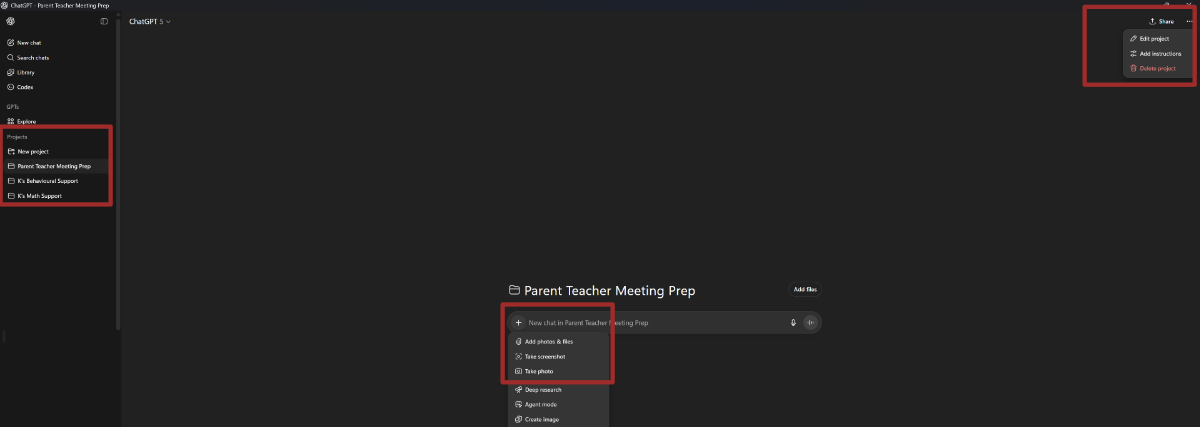
The highlighted sections show from left to right:
- Create a new project
- Upload a file (reveal the menu by clicking the ‘+’ icon)
- Add Instructions (reveal the menu by clicking the ‘...’ icon.
What ChatGPT Projects Are
A Project in ChatGPT is simply:
- A space to group your related conversations
- Somewhere to upload files or images ChatGPT can read
- A place to keep Instructions that describe the project’s goals and tone
Each Project can support one area of family life — for example:
- “Family Planner”
- “Homework and Learning Support”
- “Parent–Teacher Meetings”
- “Wellbeing Reflections”
There’s nothing technical to set up. You just click “New Project”, name it, and begin.
Why Use Projects for Family Life
| Benefit | How It Helps Parents |
| Organisation | Keeps planning, ideas, and notes in one space. |
| Consistency | Reuses your Family Master Prompt and Instructions to give context. |
| Memory | Holds your uploaded files, so you don’t need to retype or re-explain. |
| Reflection | Encourages steady, calm thinking instead of starting fresh each time. |
Project File Uploads
What File Uploads Do
When you upload a file to a Project, ChatGPT can read and use the text inside to help answer questions.
It can even read text in photos, so scanned letters or homework sheets are useful too.
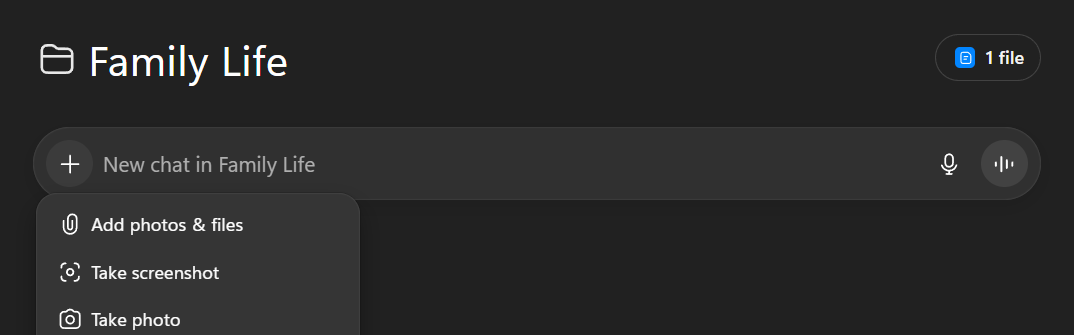
How to Upload Files
- Open your chosen Project.
- Click the “+” button.
- Choose a file — a document, PDF, or image.
- Once uploaded, you can refer to it in your prompt:
“Using the uploaded family timetable, suggest a morning routine that helps everyone be ready by 8:15.”
Best File Types to Upload
| Type | Example Use |
| Family Master Prompt (.txt) | Acts as your reusable background. Keeps tone and context consistent. We created one of these in Creating a Master Prompt. |
| School letters or newsletters (PDF or photo) | Summarise important dates or requests. |
| Homework tasks or reading lists | Create study or practice plans. |
| Family calendar or schedule | Generate meal or activity plans around your week. |
| Prompt Journal | Review what has worked well for you so far. |
Advantages of Uploading the Family Master Prompt
- Saves you from copying and pasting each time.
- Ensures ChatGPT automatically uses your family’s values and tone.
- Keeps results consistent across all your Projects.
- Makes it easier to get targeted help: “Using my Master Prompt file, suggest strategies that suit our parenting style.”
Privacy & Safety Checklist for File Uploads
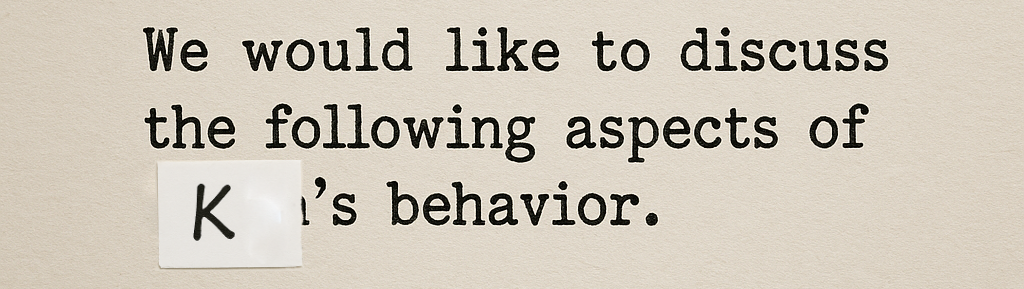
Hiding details needn’t involve learning image manipulation. Just stick a label over the identifying details and clearly handwrite a placeholder. If you used your child’s first name initial in your master prompt, use that in place of their name. For information, totally irrelevant to the matter, simply cover it with a plain sticker or cross it out.
- Anonymise before uploading — remove full names, school names, or addresses.
- Replace details with general terms like “Child A” or “local school. Either edit your photo/scan before uploading or stick a label over the details”
- Avoid medical or financial information.
- Review uploaded files regularly and delete old ones.
- Only upload documents you’d be comfortable discussing in a parent group.
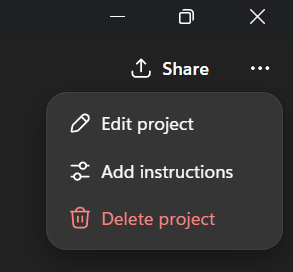
What Instructions Are
Each Project has an Instructions area — a place to describe:
- The purpose of the Project
- The main child, topic, or goal it supports
- The tone you’d like ChatGPT to use
- Any boundaries or preferences you want it to remember
The Notes act like a mini instruction sheet for that particular project.
They don’t replace your Family Master Prompt — they add focus.
How Instructions and the Master Prompt Work Together
| Family Master Prompt | Project Notes |
| Your background, values, and parenting tone. | The specific goals or focus of this project. |
| Used for all topics and children. | Used for one theme (e.g., homework or wellbeing). |
| Example: “Our family values kindness and calm routines.” | Example: “This project supports homework motivation. Keep tone upbeat and brief.” |
Writing Helpful Project Instructions
When creating Instructions, include 5 short sections:
1. Purpose:
Why you’re creating this Project.
“This Project helps manage weekly routines and planning.”
2. Focus:
What area or child it supports.
“Focus on calm mornings and shared responsibilities.”
3. Preferences:
How you like information presented.
“Use bullet points and short lists. Keep tone calm and practical.”
4. Boundaries:
What ChatGPT should avoid.
“Avoid suggesting expensive solutions or complex schedules.”
Examples of Project Instructions
A. Family Planner Project
- Purpose: Plan our week and maintain family balance.
- Focus: School, meals, chores, and rest time.
- Preferences: Short, printable checklists. Calm and organised.
- Boundaries: Avoid overloading our schedule.
B. Child Behaviour Management
Purpose: Help K manage frustration better
Focus: Analyse past situations and provide coping strategies for the future
Preferences: Provide strategies that children can understand with support notes for parental support.
Boundaries: Keep advice non-judgmental and practical
C. Learning Support Project
Purpose: Support schoolwork for our H, our 8-year-old.
Focus: Motivation, reading confidence, and project planning.
Preferences: Fun, practical ideas. Use a friendly tone.
Boundaries: No formal grading or diagnostic terms.
D. Wellbeing Project
Purpose: Reflect on family moods and emotions.
Focus: Encourage empathy and calm communication.
Preferences: Gentle, reflective tone. Include reflection questions.
Boundaries: Avoid medical or clinical advice.
Step-by-Step: Putting It All Together
- Create your Project.
Choose a clear name (e.g., “Homework & Learning Support”).
Upload your Family Master Prompt.
It sets your overall tone and context.
- Add your Project Notes.
Write your specific goals and boundaries.
- Start your chat with a reminder prompt:
“Please use my Family Master Prompt file and the Instructions in this Project to guide your response.”
- Save or rename chats inside the Project for easy tracking (e.g., “Week 1 Reading Routine”).
Suggested Ongoing Chat Threads
| Thread Name | Purpose | Example Starter Prompt |
| Weekly Planner | Organise routines | “Using my Project Notes and Family Master Prompt, plan next week’s schedule.” |
| Homework Ideas | Support school learning | “Using the uploaded homework photo, create a 15-minute study plan.” |
| Parent–Teacher Prep | Prepare meeting notes | “Summarise the uploaded report and suggest five calm discussion questions.” |
| Family Reflection | Encourage emotional well-being | “Guide me in a short reflection on our week — what went well and what could improve.” |
Reflection Questions
| Question | Why It Matters |
| What kind of Project would make your week easier? | Focuses on practical benefits. |
| What information could you upload safely to save time later? | Reinforces privacy and efficiency. |
| What tone or focus would you describe in your Notes? | Encourages confidence in customisation. |
| How could these Projects reduce stress or improve consistency at home? | Connects the tool to family well-being. |
Key Takeaways
- Projects are your organised spaces for family planning and learning.
- File Uploads give ChatGPT useful background information.
- Instructions guide the focus, tone, and boundaries for each project.
- Together, they create a reliable, calm system that supports you over time.
- You remain in control. ChatGPT helps you plan, think, and stay organised.
Was this guide helpful?
Let us know whether this article helped you.
Share this guide with other parents
Know a parent who would find this guide helpful? Enter their email address and we'll send them the Parent Conversation Guide directly.