
📑 In this guide
Start with our AI Confidence Quiz
AI is already part of your child’s learning. In just a couple of minutes, discover where your family stands and what to do next.
- ✓ Your family’s AI Confidence Score
- ✓ What you’re already doing well
- ✓ Simple, practical next steps
For most families, the practical answer is to teach children about AI safely and gradually, with an adult in charge. Children under 13 do not need private access to general-purpose AI chatbots to learn about AI. They need simple rules, good examples and supervised chances to practise making sensible decisions.
Think about how you teach your child to cross a road.
You know roads can be dangerous. You also know your child will need to cross them throughout their life. So you do not simply tell them to stay away from roads forever.
You start by holding their hand.
You show them where to cross. You explain why you stop at the curb, why you look both ways and why you keep checking as you cross. Later, you might ask, “Tell me when you think it is safe to go.”
Your child starts making the decision, while you are still there to keep them safe.
Teaching AI literacy can follow the same principle.
Should I ban AI for my child?
A complete ban can reduce your child’s exposure to some AI tools at home. It cannot teach them what to do when they meet AI somewhere else.
Children may encounter AI in search tools, learning apps, games, school software and other online services. As they get older, they are likely to meet it more often.
Preparation gives them something a ban cannot: practice making safer decisions.
That does not mean giving a young child an AI account and leaving them to work things out. For elementary-aged children, parents should stay in charge of general-purpose AI use. If you choose to explore a chatbot together, you can use an adult account where the service allows it, stay with your child and share the experience on the same screen.
The child can still take an active part. They can learn to question answers, protect private information, spot poor uses of AI and decide when another tool or a real person would be a better choice.
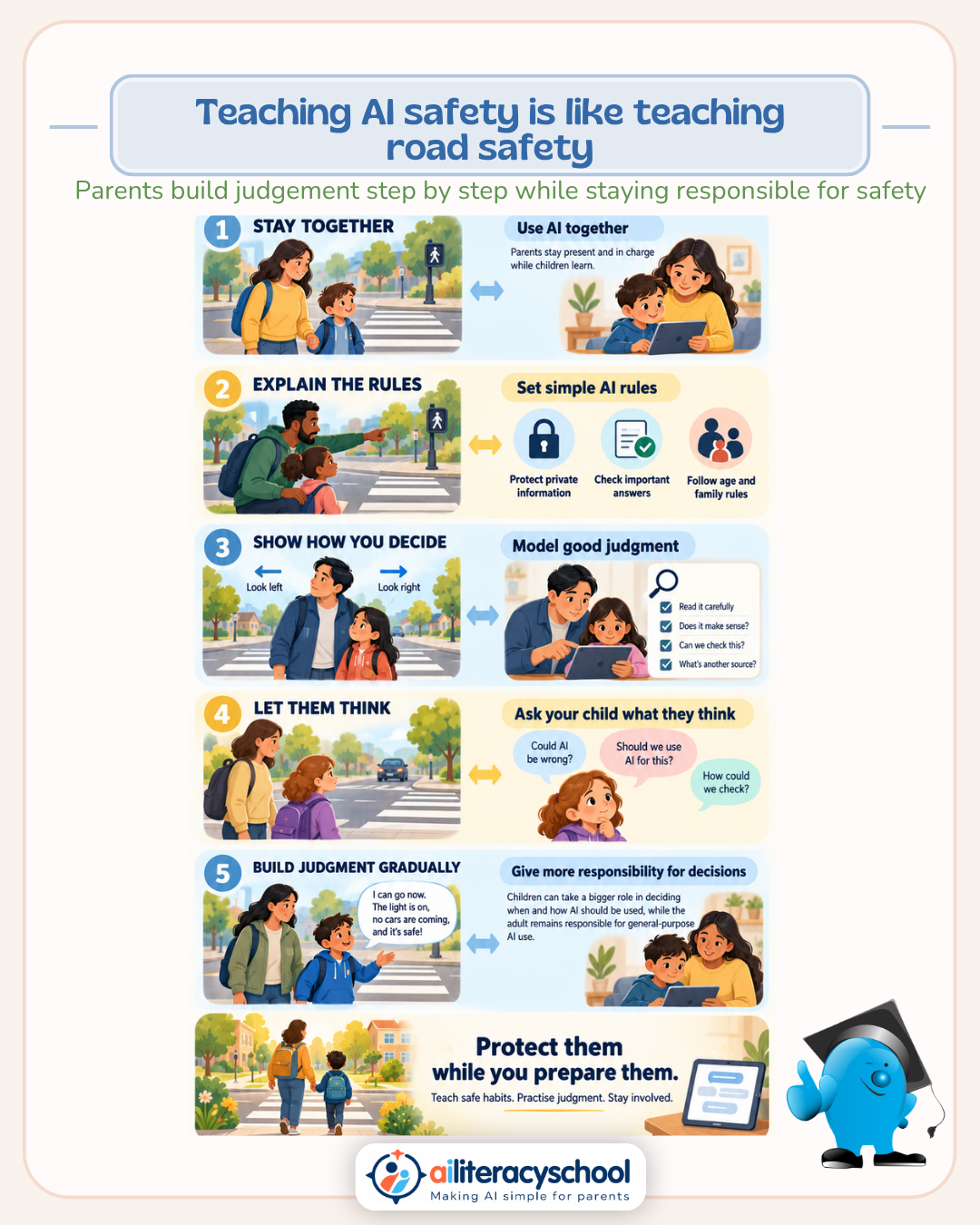
Teach AI safety like you teach road safety
Road safety works because children hear simple rules many times and see adults following them. They also learn why the rules exist.
You can use the same approach with AI.
| Crossing the road | Using AI |
|---|---|
| Stay with an adult while you are learning. | Explore general-purpose AI together, with the parent in charge. |
| Stop and look before you move. | Pause before accepting or acting on an AI answer. |
| Check in more than one direction. | Check important information using another trusted source. |
| Follow safe crossing rules. | Follow family rules, school rules and the age rules for the tool. |
| Do not run into the road without thinking. | Do not enter private information or act on advice without thinking first. |
| Learn to judge when it is safe while an adult watches. | Let your child explain when AI is useful, when it might be wrong and when they should avoid it. |
Start by setting a good example
Children learn road safety partly by watching you. If you step into the street while looking at your phone, the rule about paying attention becomes harder to believe.
AI is similar.
If your child sees you accepting every AI answer without checking it, sharing private information or asking AI to do all your thinking, your family rules will carry less weight.
Instead, let your child hear some of your thinking when you use AI.
- “That sounds possible, but I want to check it.”
- “We don't need to tell the AI your name or school to ask this question.”
- “I could ask AI to do this for me, but I want to work it out myself first.”
- “This is advice about something important. I would rather ask a real person who knows about it.”
These small comments show your child that using AI well involves judgment.
Give children simple AI rules — and explain why
“Look both ways” is easier for a child to remember than a long explanation of traffic risk.
Your family AI rules should be just as clear.
1. Keep private information private
Do not put names, addresses, school details, passwords, private photos or personal family information into an AI tool unless there is a clear reason and you have checked that it is appropriate.
Explain why: information entered into online services may be stored or used in ways a child does not understand.
2. AI can be wrong
AI can give an answer that sounds confident and still be false. This is sometimes called an AI hallucination.
Teach your child to treat an AI answer as something to consider, rather than automatic proof.
3. Check important answers
If an answer affects schoolwork, health, safety, money or another important decision, check it with a suitable source or person.
A useful family phrase is: “How could we check that?”
4. Use AI to help thinking, not replace it
AI might help explain a difficult idea, create extra practice questions or suggest different ways to approach a problem.
It should not complete schoolwork that your child is expected to do themselves.
Try asking: “Is the AI helping you understand this, or doing the work for you?”
5. Real people handle important personal problems
A chatbot can produce human-sounding replies. It does not know your child in the way a parent, teacher, doctor, counselor or trusted adult does.
Teach children that personal, emotional, medical and safety problems should come to a suitable real person.
6. Stop when something feels wrong
If AI shows something upsetting, asks for information your child is unsure about, gives strange advice or starts taking the conversation somewhere uncomfortable, they should stop and tell you.
They do not need to keep talking to a machine just because it asks another question.
Let your child practise making decisions
Eventually, you want a child crossing the road to notice the traffic and make a safe judgment themselves.
You can practise the same skill around AI without giving an elementary-aged child private chatbot access.
When you use AI together, start asking your child for their view:
- “Do you think AI is a good tool for this?”
- “What information would be safe to include?”
- “What could the AI get wrong?”
- “How could we check this answer?”
- “Should we use the answer, change it or ignore it?”
- “Would it be better to do this ourselves?”
You can also let your child help create a prompt while you type it. Afterwards, look at the response together and discuss whether it was useful.
This gives children experience of making AI decisions while the adult still carries the responsibility.
Gradual responsibility does not have to mean independent AI use
This part of the road-crossing analogy needs care.
A child eventually crosses roads without a parent. That does not mean an elementary-aged child needs to progress toward using general-purpose AI alone.
You can increase your child's role in the decision before increasing their access to the technology.
For example:
- You decide. You choose whether AI is appropriate and explain your decision.
- You decide together. Ask your child what they think, then make the final choice yourself.
- Your child explains their choice. Ask them whether AI should be used and why. You still approve the decision.
- You reflect together. After using AI, discuss whether it helped, what it got right and what you would do differently next time.
This teaches judgment without expecting a young child to manage all the risks alone.
Sometimes the safe answer is still “no”
Teaching children about roads does not mean letting them cross every road.
Some situations are too difficult or risky for their age.
The same applies to AI. You might decide that a particular tool, feature or use is unsuitable for your child. Reasons could include weak age protections, poor privacy controls, adult content, emotional or companion-style conversations, or a tool designed to keep users chatting for long periods.
You can explain the decision simply:
“You are learning how AI works, but I don't think this tool is suitable for you to use.”
Children can learn about something without having unrestricted access to it.
What if my child is already using AI?
Start with curiosity rather than turning the first conversation into an interrogation.
Ask what they use, what they use it for and what they think it is good at. Look at the tool together if you can.
Then agree on a few clear family rules.
You may need to change how a tool is being used. You may decide that your child should stop using one completely. You may also find useful activities that you can do together under your supervision.
The aim is to make it easy for your child to tell you about their AI use. Children are safer when they know they can come to you after a mistake, strange answer or uncomfortable experience.
What should parents teach children about AI?
For an elementary-aged child, start with a small set of ideas:
- AI is a tool. It can be useful, and people still make the decisions.
- AI makes mistakes. A confident answer can still be wrong.
- Private information needs protecting. You do not have to tell an AI everything it asks.
- AI should help you think. It should not replace learning, practice or your own ideas.
- Important advice comes from suitable people. Parents, teachers and other trusted adults understand things an AI system cannot.
- You can stop. If something seems strange, upsetting or unsafe, leave the tool and tell an adult.
A practical approach: protect them while you prepare them
Crossing the road is dangerous when children do not understand the risks. Keeping a child away from every road forever would leave them unprepared for ordinary life.
AI deserves the same calm thinking.
Stay involved. Set clear boundaries. Explain your reasons. Model sensible use. Give your child supervised chances to make decisions and explain their thinking.
As they grow, those habits give them something more useful than a list of banned websites: a way to judge new AI tools they have never seen before.
Build safer AI habits with your child
The AI and Safety Pathway from AI Literacy School helps parents understand the AI risks children may face and turn them into simple family conversations and safer habits.
You will learn about AI mistakes, privacy, trust, persuasive AI, supervision and how to respond when an AI tool gets something wrong.
Explore the AI and Safety Pathway
Was this guide helpful?
Let us know whether this article helped you.
Share this guide with other parents
Know a parent who would find this guide helpful? Enter their email address and we'll send them the Parent Conversation Guide directly.