📑 In this guide
Start with our AI Confidence Quiz
AI is already part of your child’s learning. In just a couple of minutes, discover where your family stands and what to do next.
- ✓ Your family’s AI Confidence Score
- ✓ What you’re already doing well
- ✓ Simple, practical next steps
Produced by AI Literacy School with the support of Educational App Store
You can find Educational Apps for kids assessed by teachers on the EAS AI Tool Library.
AI apps for children are becoming easier to find, but harder to judge. Some promise better learning, quicker homework help, creative activities, or a more personal learning experience. Others may be little more than a general chatbot with child-friendly colours.
For parents, the question is not simply “Is this app powered by AI?” A better question is:
Does this AI app genuinely help my child learn, create, or practise in a safe and age-appropriate way?
This guide brings together AI Literacy School’s focus on helping parents understand AI with Educational App Store’s experience reviewing and assessing educational apps. It is designed for parents of elementary-aged children who want a clear, practical way to choose AI apps with more confidence.
Why choosing an AI app is different from choosing a normal app
A traditional learning app usually follows fixed rules. It asks questions, gives feedback, and moves a child through set activities.
An AI app can respond in more flexible ways. It might generate explanations, answer questions, create stories, give feedback on writing, or adapt to a child’s responses.
That can be helpful. It can also create new things for parents to check.
For example:
- The app may give answers that sound confident but are wrong.
- The app may collect or process information about your child.
- The app may encourage too much dependence on hints or answers.
- The app may not be designed with younger children’s safety in mind.
- The app may add AI without adding much educational value.
A good AI app should do more than produce impressive responses. It should support your child’s learning, protect their privacy, and give parents clear information about how it works.
A simple parent test: helpful, safe, trustworthy
When looking at an AI app for your child, it helps to think about three areas.
1. Is it genuinely helpful?
The app should offer something more useful than a general-purpose chatbot. For elementary-aged children, this might include:
- Age-appropriate explanations.
- Helpful hints rather than just answers.
- Step-by-step learning support.
- Clear activities linked to skills.
- A child-friendly design that makes the task easier.
- Support for creativity, practice, or reflection.
- Features that help parents understand what their child is doing.
Be cautious if the app mainly feels like a chatbot in a colourful wrapper. Ask:
What does this app help my child do better than they could do with a standard search engine, worksheet, or chatbot?
A strong AI learning app should support thinking, not replace it.
2. Is it safe for the age of my child?
Safety does not mean avoiding every AI tool. It means choosing tools that are designed carefully for children and using them with appropriate adult guidance.
Look for signs that the app has considered younger users:
- Clear age guidance.
- Parent controls or parent information.
- Content filters.
- Limits on open-ended chat.
- A way to report problems.
- No encouragement for children to share personal information.
- Clear information about how the AI responds to children.
- Safeguards around unsuitable content.
For elementary-aged children, avoid apps that simply give children unsupervised access to general-purpose AI chatbots.
A useful parent question is:
Would I be comfortable with my child using this app nearby while I can see the kind of responses it gives?
For younger children, starting together is usually best.
3. Can you trust how it handles your child’s information?
AI apps often need information to work well. Some may ask for a child’s name, age, school level, interests, writing, voice, images, or learning progress.
Before using an app, check what it says about privacy. You do not need to understand every legal detail, but you should be able to find clear answers to basic questions:
- What information does the app collect?
- Is the app designed for children?
- Can parents control or delete data?
- Is children’s data used to train AI models?
- Are there adverts or tracking tools?
- Does the app explain privacy in plain language?
A good app should not make privacy hard to understand.
Five questions to ask before choosing an AI app
1. What is the app actually for?
Look for a clear purpose. Is it for reading practice, maths support, writing feedback, language learning, creativity, coding, revision, or homework help?
Be careful with apps that claim to help with everything. Children usually benefit from tools with a clear learning goal.
A parent-friendly test:
“Can I explain in one sentence what this app helps my child practise or understand?”
If not, the app may not be focused enough.
2. Does it help my child think?
The best educational AI apps should support effort. They should ask questions, offer hints, explain mistakes, and encourage children to try again.
Less helpful apps may simply provide answers.
Look for phrases or features such as:
- Try again.
- Here is a hint.
- Let’s think about the first step.
- Can you explain your answer?
- What do you notice?
- Show your working.
- Review your progress.
Avoid apps that make it too easy for a child to skip the learning and collect the answer.
You might say to your child:
“Let’s use this to help you think through the problem, not to do the problem for you.”
3. Are the responses right for my child’s age?
Elementary-aged children need clear, simple, concrete explanations. An AI app should not assume adult reading skills or give long, confusing responses.
Try asking the app a few questions yourself:
- Does it explain things in child-friendly language?
- Does it keep answers short enough?
- Does it avoid unsuitable topics?
- Does it respond calmly when the child makes a mistake?
- Does it encourage learning rather than rushing?
If the app often gives answers that are too long, too advanced, or too open-ended, it may not be the right fit for your child yet.
4. What can parents see or control?
Good AI apps for children should not shut parents out. Look for:
- Parent dashboards.
- Progress reports.
- Activity history.
- Clear settings.
- Age controls.
- Privacy controls.
- Ways to limit features.
- Easy cancellation or account deletion.
You do not need to monitor every moment. But you should understand what your child can do in the app and what the app can do in response.
A helpful early step is to use the app together for the first session. Watch how your child responds to it. Notice whether they are curious, focused, frustrated, passive, or tempted to ask for answers.
5. Who has reviewed or assessed it?
Some AI apps make strong claims about learning, safety, or personalisation. Look for evidence behind those claims.
Useful signs include:
- Independent reviews.
- Educational assessment.
- Clear information about learning design.
- Named child safety practices.
- Transparent privacy information.
- Evidence from schools, teachers, or families.
- A company that explains its approach clearly.
Educational App Store’s role in this collaboration is especially relevant here, because app assessment experience can help parents look beyond marketing claims and consider whether an app is educationally useful, safe, and suitable for children.
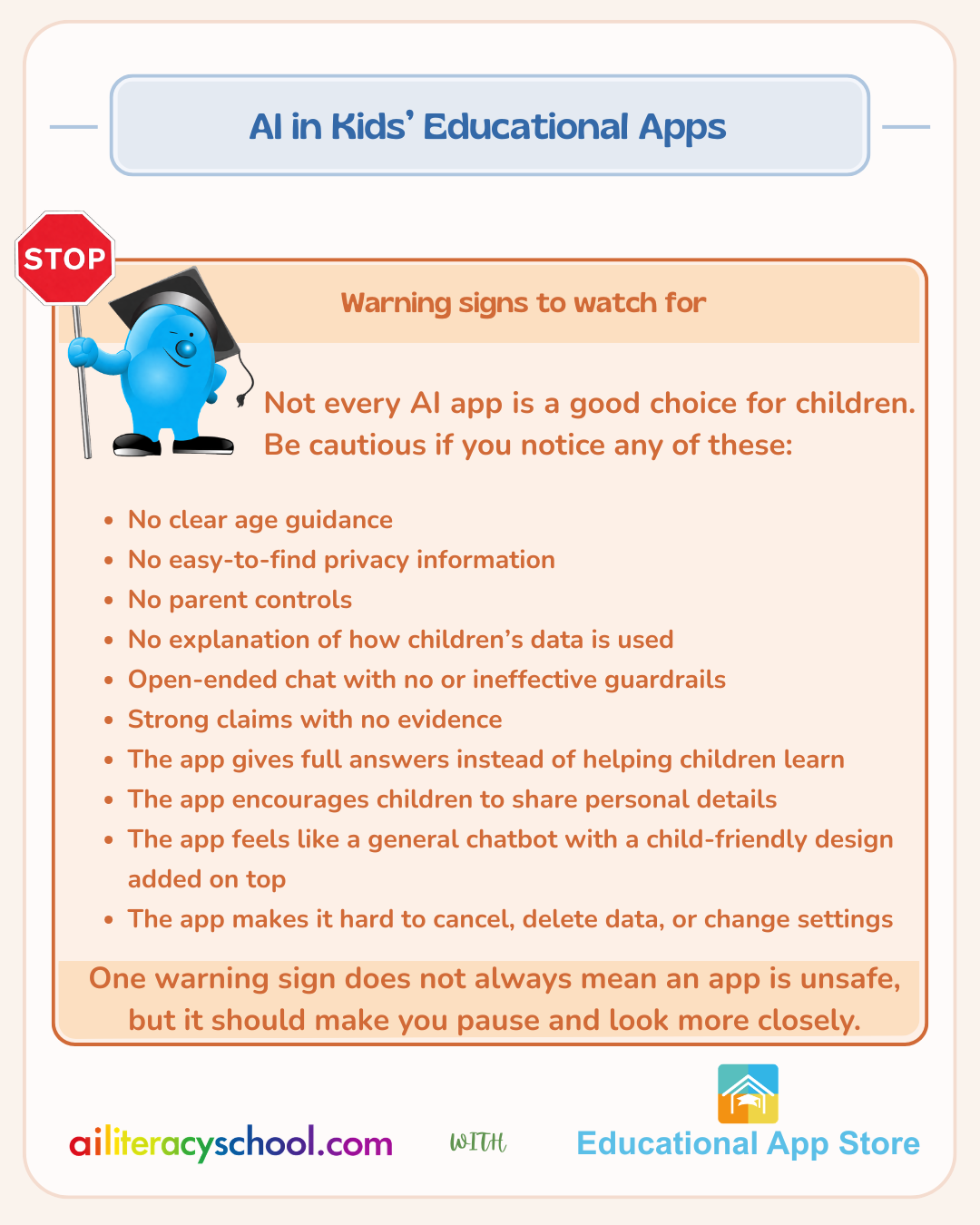
Warning signs to watch for
What a good AI app can offer
When designed well, AI can support children in positive ways.
A good AI app might help your child:
- Practise reading with feedback.
- Get a simpler explanation of a tricky idea.
- Build confidence before asking an adult for help.
- Plan a story or improve a piece of writing.
- Practise maths steps without feeling rushed.
- Explore creative ideas.
- Learn from mistakes.
- Reflect on how they solved a problem.
The goal is not to replace parents, teachers, books, or play. The goal is to add useful support at the right moment.
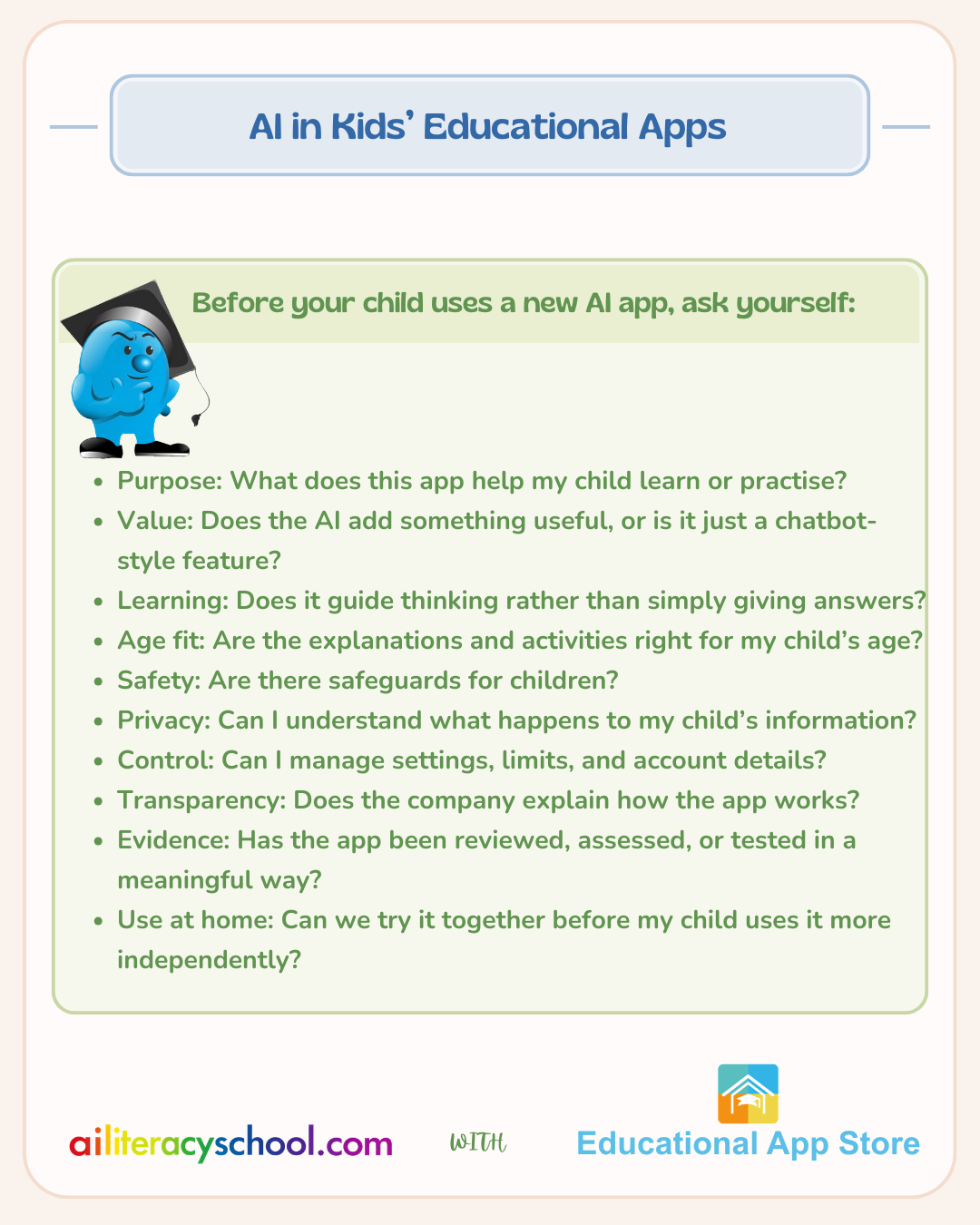
A practical checklist for parents
How to introduce an AI app to your child
The first conversation matters. It does not need to be long or technical.
You might say:
Some apps use AI to give answers or suggestions. That can be helpful, but it can also make mistakes. We are going to try this together and see whether it helps you learn.
Then, after a few minutes, ask:
- What did the app help you do?
- Did anything feel confusing?
- Did it give you an answer, or help you think?
- Would you use it again for this kind of task?
- Is there anything you would still ask a person?
These questions help children see AI as a tool, not an authority.
The bottom line for parents
Choosing an AI app for an elementary-aged child is not about finding the most advanced tool. It is about finding a tool that is useful, safe, understandable, and suited to your child’s stage of development.
A strong AI app should:
- Support learning.
- Respect privacy.
- Include suitable safeguards.
- Give parents clear information.
- Help children think, not simply copy answers.
Parents do not need to become AI experts overnight. A careful look at purpose, safety, privacy, and learning value can go a long way.
AI can be a helpful part of children’s learning when it is chosen carefully, used thoughtfully, and supported by good conversations at home.
Further Reading:
Children's toys are increasingly adding AI. These need a different level of consideration from parents. You can learn about AI in Kids Apps in this guide.
Our AI insights and Educational App Store's hands-on assessment of 100+ AI apps for education inform our learning pathway Choosing AI Tools for Learning | Know What to Look For Before You Pay.
Was this guide helpful?
Let us know whether this article helped you.
Share this guide with other parents
Know a parent who would find this guide helpful? Enter their email address and we'll send them the Parent Conversation Guide directly.